


Managing subscriptions in WooCommerce can feel a bit like running a marathon in flip-flops. Yes, you can make it to the finish line, but it won’t be smooth or enjoyable without the right setup.
If you run a WooCommerce store, you already know this. Selling a subscription is simple.
The real work begins when you have to manage everything that comes after. A customer wants to pause their plan for a month. Someone’s credit card fails on renewal. Another user wants to downgrade from Pro to Basic halfway through the cycle.
These are everyday subscription challenges. And without the right WooCommerce subscription management system, they turn into extra support work, frustrated customers, and unnecessary churn.
In this guide, I’m going to walk you through how to manage subscriptions the smart way, not just by installing plugins, but by building a solid subscription workflow.
You’ll have flexible billing schedules, automated dunning (so failed payments don’t slip away), customer self-service options, and the retention practices used by top subscription brands.
Whether you’re selling a subscription box, digital membership, or a recurring service, this guide will help you take full control of your WooCommerce subscription lifecycle and build predictable recurring revenue.
What is WooCommerce Subscription Management?
WooCommerce subscription management is the system you use to handle everything that happens throughout a customer’s subscription from the moment they sign up to the day they renew, pause, upgrade, or cancel.
Think of it as the subscription lifecycle:
Create → Activate → Renew → Upgrade/Downgrade → Pause/Resume → Cancel → Reactivate
Each stage needs a clear system, because subscribers expect flexibility. They want to change plans, update billing details, skip a delivery, or fix a failed payment without having to contact support every time.
In WooCommerce, subscription management typically includes:
- Acquisition: Creating and editing subscription products
- Recurring billing: Managing billing schedules and renewal cycles
- Switching: Handling upgrades, downgrades, and plan swaps
- Retention (dunning): Dealing with failed payments and retries
- Self-service: Letting customers update cards, addresses, and preferences
- Churn prevention: Managing cancellations, pauses, and reactivation offers
- Notifications: Sending notifications for renewals, expiries, and payment issues
- Insights: Tracking MRR, churn and subscriber activity
Why Subscription Management Matters for WooCommerce Stores
Subscription products aren’t just another revenue stream; they’re the backbone of predictable, stable income. But that only works if you manage them properly.
When your subscription management system is solid, everything feels smooth.
Renewals happen on time, customers can make changes themselves, and failed payments don’t automatically lead to churn. When it’s not set up well, even minor issues like an expired card can snowball into lost revenue.
Here’s why subscription management is so critical for WooCommerce stores:
1. Predictable monthly recurring revenue (MRR)
Instead of starting every month at zero, you know exactly how much revenue is already committed. This makes forecasting, budgeting, and scaling much easier.
2. Higher customer lifetime value (LTV)
Subscribers stay longer, spend more, and buy more often. Good management keeps them active and engaged.
3. Lower churn and fewer support tickets
When customers can upgrade, downgrade, pause, or update payment methods on their own, they stay longer and contact you less. Less friction = fewer cancellations.
4. Automated revenue recovery
Failed payments are normal. The problem is when you don’t have an automated process (dunning) to recover them. A strong subscription system quietly recovers revenue in the background.
5. Smooth scaling as you grow
Whether you have 50 or 5,000 subscribers, a well-managed subscription workflow keeps operations running smoothly.
6. Better customer experience
People expect flexibility. They want to manage their subscription on their terms.
If you offer that, they stay. If you don’t, they churn.
The Problems With Default WooCommerce Subscription Management
WooCommerce is a powerful ecommerce platform, but out of the box, it has no built-in subscription system.
You need plugins to handle even basic recurring payments. And even when you add its subscription plugin, many store owners quickly discover the same limitations.
Here are the most common pain points with default or basic WooCommerce subscription setups:
1. Limited control over plan changes
Customers today expect complete control over their subscriptions, such as upgrading, downgrading, pausing for a month, skipping a delivery, or changing order quantities.
Most basic setups make this complicated or messy, which leads to frustration and support tickets.
2. Proration is complicated
When someone switches plans mid-cycle, how do you calculate what they owe or what credit they should get?
Without a proper system, proration becomes guesswork, and mistakes lead to refunds, disputes, or accounting headaches.
3. Weak failed payment recovery (dunning)
Many subscription systems send one email and call it a day. But failed payments are the #1 cause of involuntary churn, which is entirely avoidable with better automation.
4. No centralized subscriber dashboard
Customer self-service is also limited. Subscribers need an easy way to update their card, change their address, switch plans, or review upcoming renewals.
Many WooCommerce setups lack a clean, user-friendly portal, so customers end up emailing support for every small request.
5. Renewal issues and payment gateway conflicts
There are various issues with subscription renewal reliability, including gateway conflicts, webhook delays, cron failures, and plugin incompatibilities.
These technical hiccups quietly break subscription flows and often aren’t caught until customers complain. It’s important to catch those before a customer does.
6. Limited analytics for MRR, churn, and growth
Finally, WooCommerce doesn’t provide meaningful subscription analytics. You don’t get churn rate, MRR, recovery rate, cohort retention, or upgrade/downgrade trends.
Without these numbers, you’re essentially running a subscription business in the dark.
In short, WooCommerce can handle subscriptions, but it can’t optimize them on its own. To truly scale a subscription business without creating chaos behind the scenes, you need a more complete subscription management system.
How to Set Up WooCommerce Subscription Management (Step-by-Step)
Managing subscriptions in WooCommerce doesn’t have to be complicated. With the right tools, you can automate most tasks, reduce churn, and deliver a seamless experience to your customers.
One plugin that makes this easy is Sublium, a powerful WooCommerce subscription management solution trusted by growing stores.
Sublium automates the tricky parts of recurring billing, gives customers flexibility, and provides insights that help you scale with confidence.
Here’s how you can set up your subscription workflow step by step:
Step 1: Install and activate Sublium
Sublium integrates directly with WooCommerce, giving you complete control over your subscriptions.
After installing and activating the plugin, you’ll see a new “Sublium Subscriptions” option in your WooCommerce dashboard.
Step 2: Create a subscription product in WooCommerce
With Sublium, you can set up subscription products in minutes.
Sublium lets you create different subscription plans in WooCommerce:
- Recurring (for digital subscriptions)
- Subscribe and save (for physical product deliveries)
- Installments (for high-ticket digital and physical product payment plans)
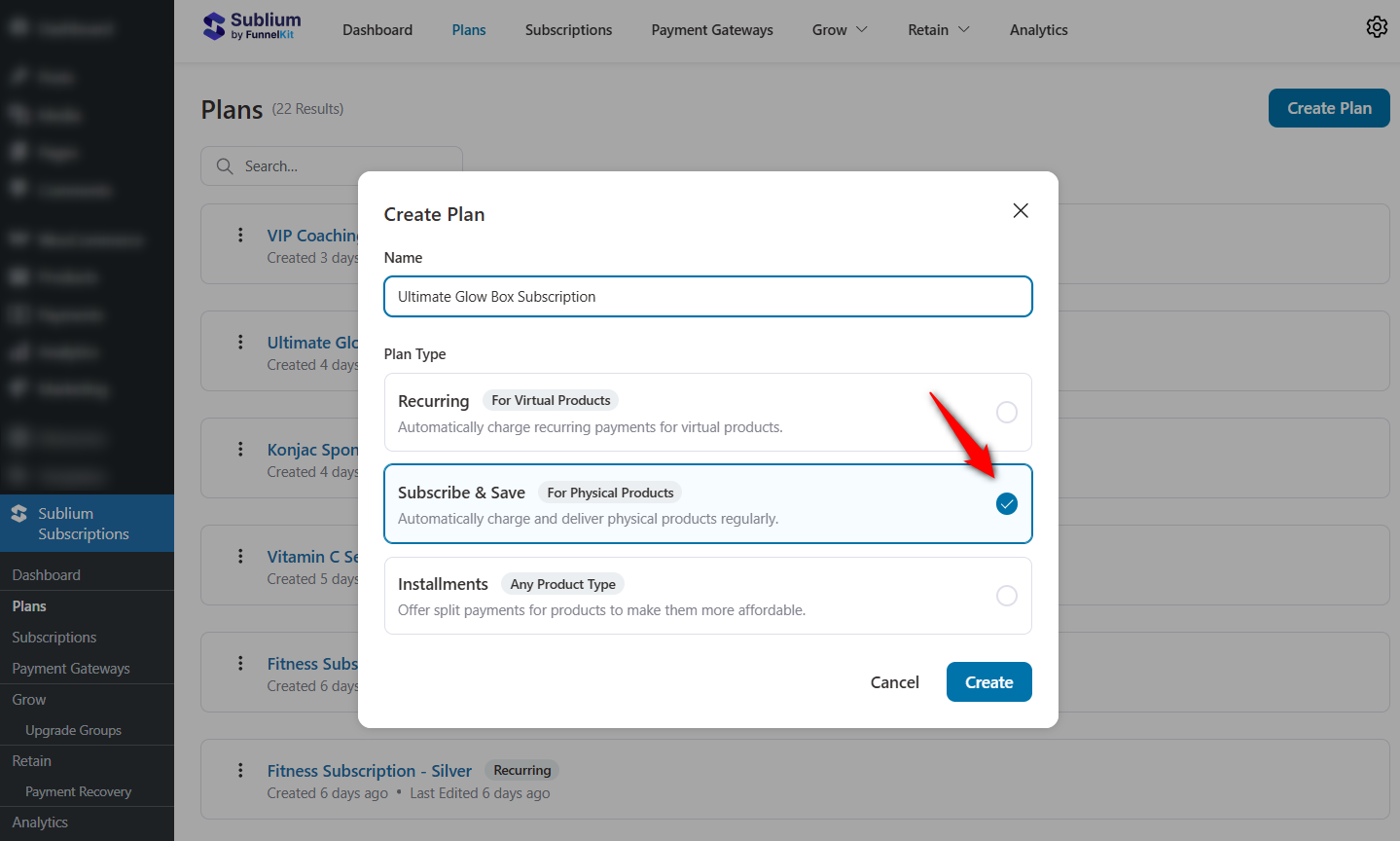
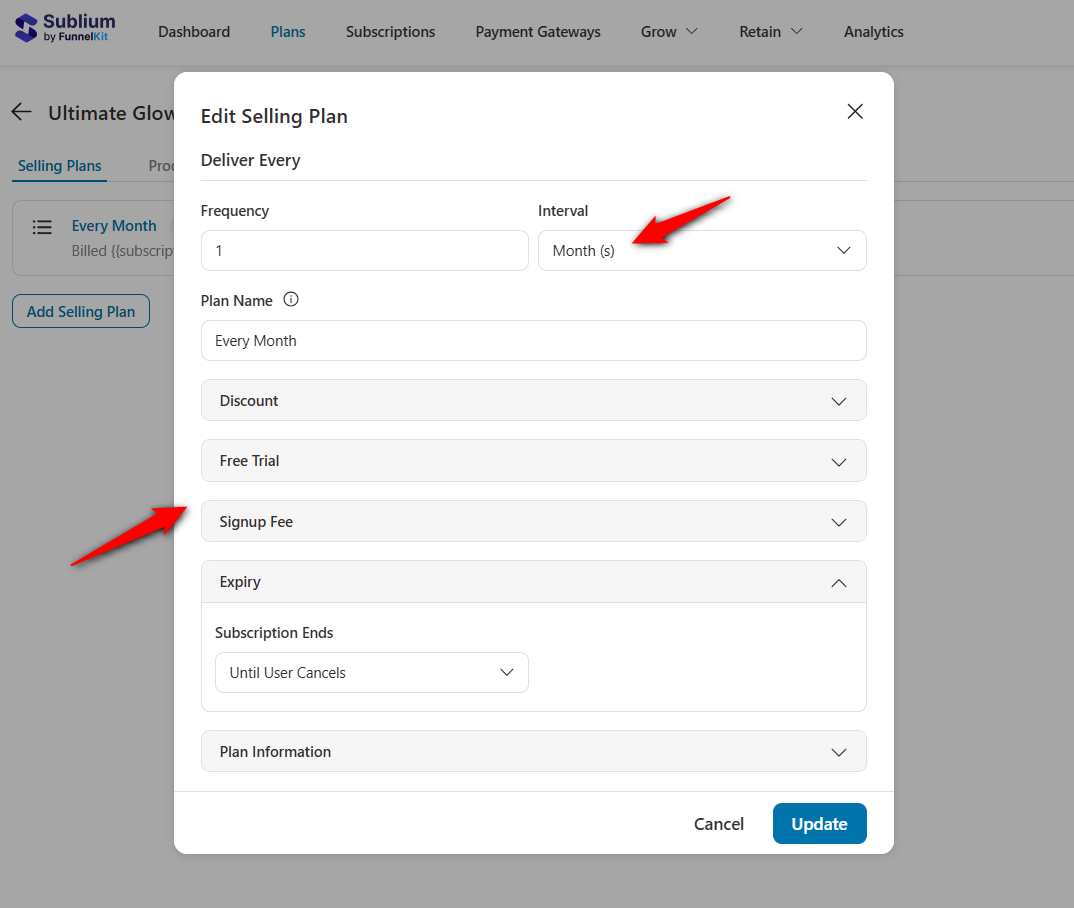
Choose your billing frequency (weekly, monthly, annually), add optional free trials, and configure pricing.
Once your plan is ready, add your product to the subscription plan.
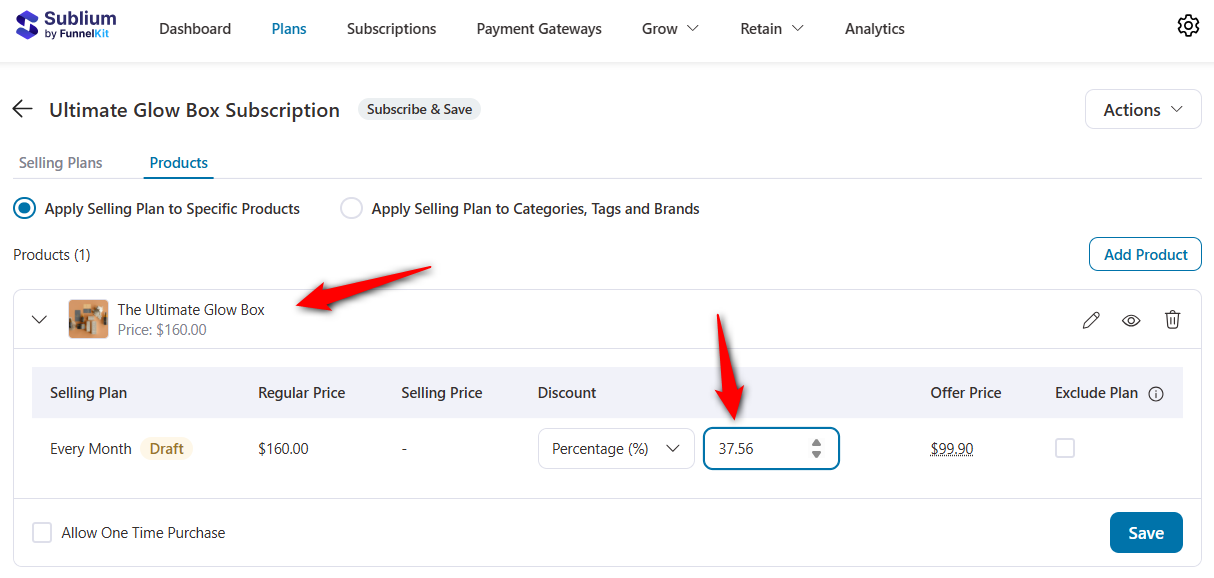
You can even offer different tiers like Basic, Pro, or Premium.
Refer to our detailed post on creating and selling subscription products in WooCommerce.
Step 3: Configure recurring payments
Connect your preferred payment gateway, such as Stripe, PayPal and Square.
Go to the Payment Gateways section and integrate with your preferred payment provider.
Offer multiple payment options, including credit/debit cards, Apple Pay, Google Pay, PayPal, and more.
More payment choices = higher signup and renewal success rates.
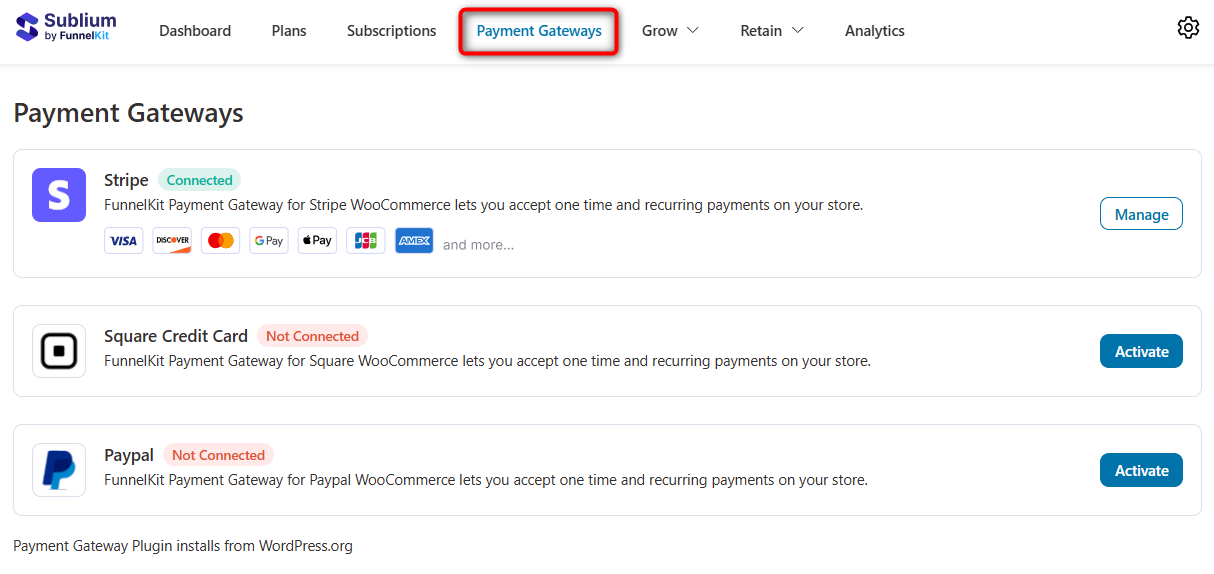
Once connected, Sublium will automatically process renewals, send payment confirmation emails, handle retries, and update subscription status.
All this happens without manual invoicing or missing renewals.
Step 4: Enable plan upgrades and downgrades
One of the most significant contributors to retention is flexibility.
Sublium allows customers to upgrade or downgrade at any time (even mid-cycle) with accurate prorated billing.
Navigate to Grow ⇨ Upgrade Groups, and you’ll get the option to select the old and new products for the subscription switch.
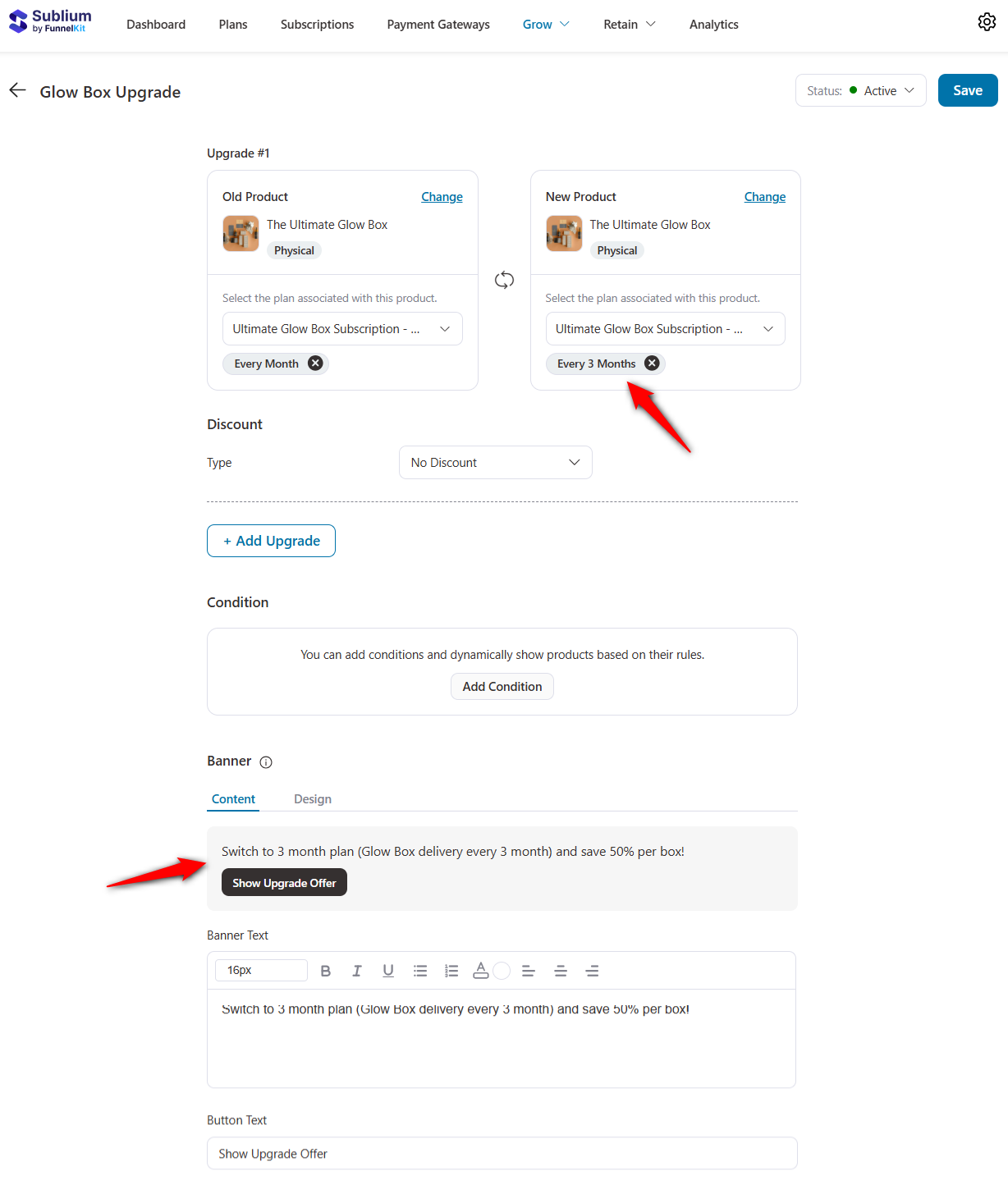
Set any discounts or conditional display rules if you want and edit the banner text.
These upgrade options appear directly inside the WooCommerce My Account page, making it easy for customers to switch plans without contacting support.
Sublium automatically calculates proration, ensuring fair and accurate billing without extra work on your part.
Step 5: Set up dunning and failed payment recovery
Failed payments are one of the biggest silent revenue killers in subscription businesses.
In fact, 20-40% of churn happens due to payment failures, not because customers want to cancel, but because their cards expired, hit limits, or were temporarily blocked.
Sublium automatically recovers this revenue through its built-in dunning system (failed payment recovery).
Configure Payment Retry Rules
To set it up, navigate to Retain ⇨ Payment Recovery, set the number of retries and delay between them:
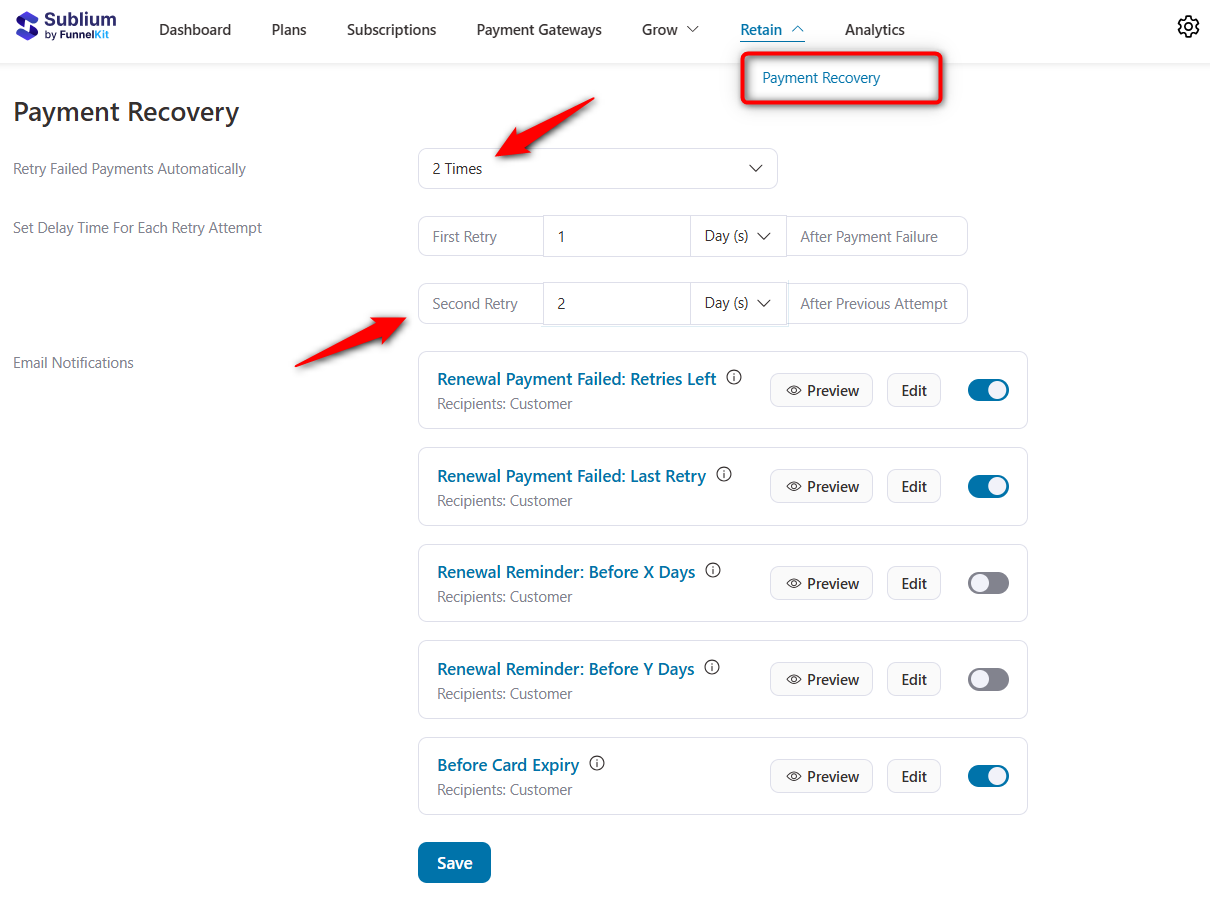
Once configured, Sublium will automatically retry renewals according to your schedule, without any manual follow-up.
Customize Failed Payment Emails
Next, personalize the email reminders sent during each retry attempt.
Click on ‘Edit’ next to any retry stage to open the visual email builder.
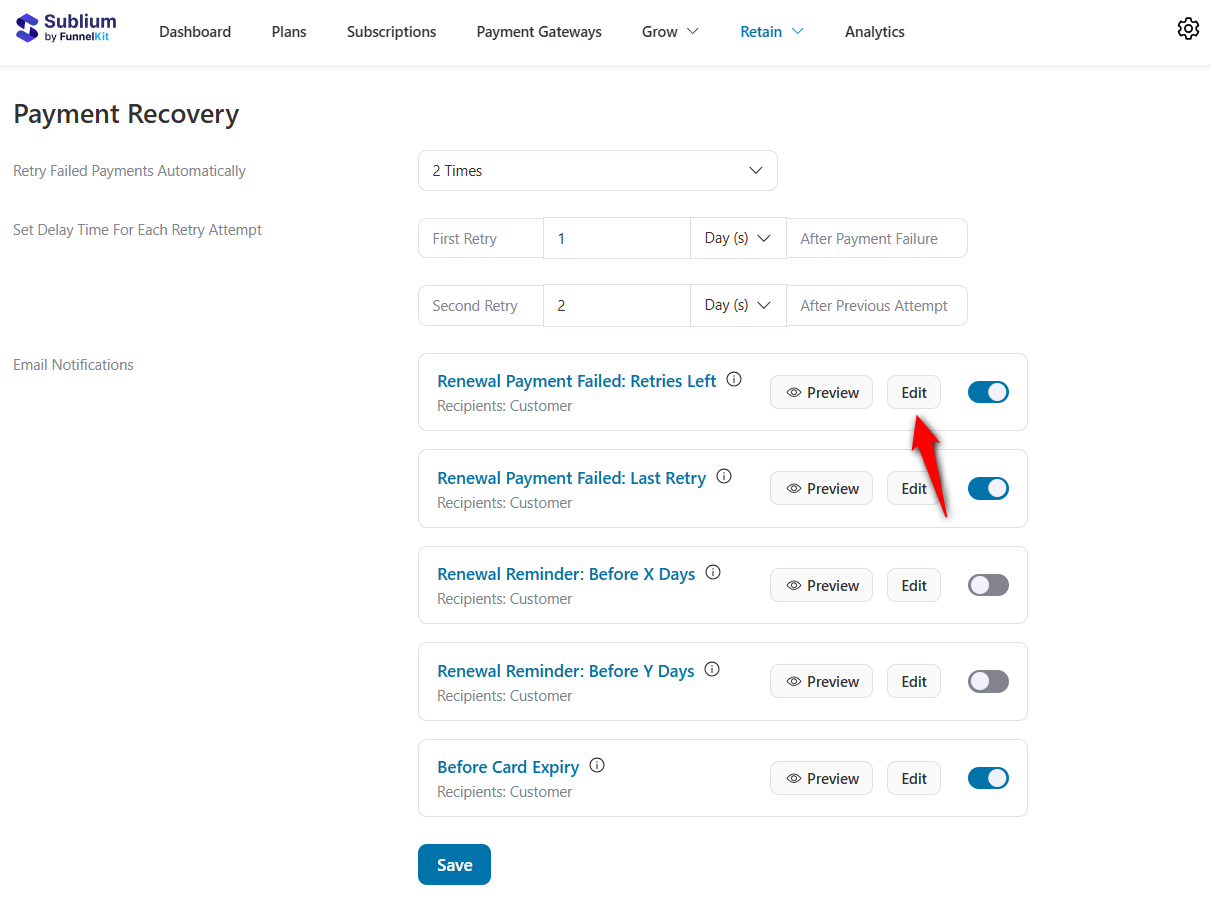
Sublium’s drag-and-drop email builder lets you add your logo and branding, insert merge tags (customer name, subscription name, renewal amount, retry date, etc.).
You can even include clear CTAs for updating payment methods and easily adjust the layout and content.
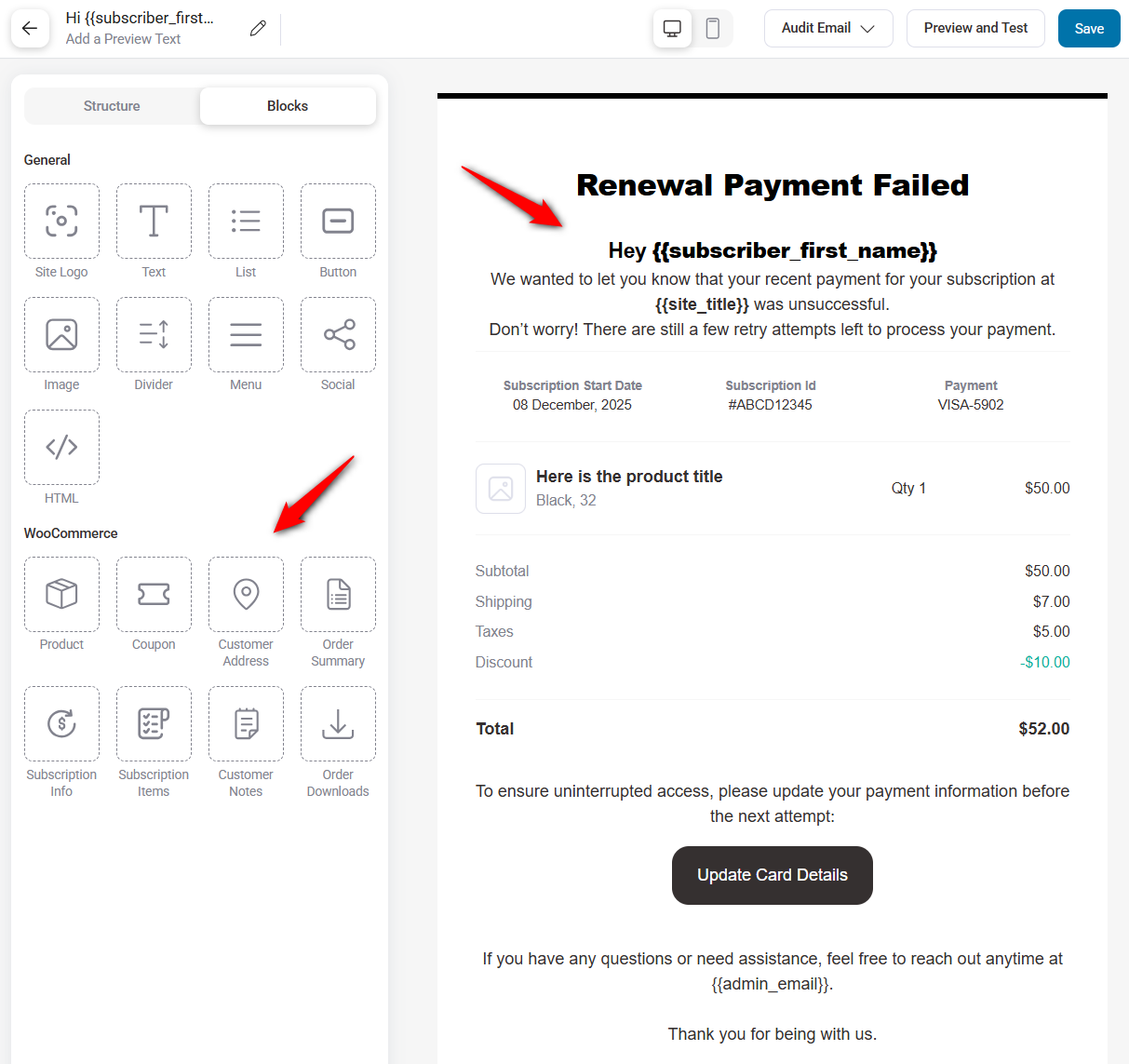
Before publishing, use the built-in audit tool to check for broken links, large email size, and missing unsubscribe tags.
You can also send test emails to preview how your message looks across different inboxes.
Once you’re happy with your design, click ‘Save’ to apply your changes.
With payment recovery fully automated, you’ll significantly reduce involuntary churn while giving customers a smooth way to update their payment details.
Step 6: Empower customers with a self-service portal
A self-service portal is one of the most effective ways to reduce support tickets and boost subscriber satisfaction.
Customers today expect flexibility. They want to manage their subscriptions without opening support tickets or waiting for replies.
Sublium gives your subscribers a complete, intuitive account management dashboard where they can update billing details, modify plans, pause or resume subscriptions, and view their order or payment history anytime.
To manage customer account actions, navigate to Sublium ⇨ Settings, then click the ‘Customer Account’ tab.
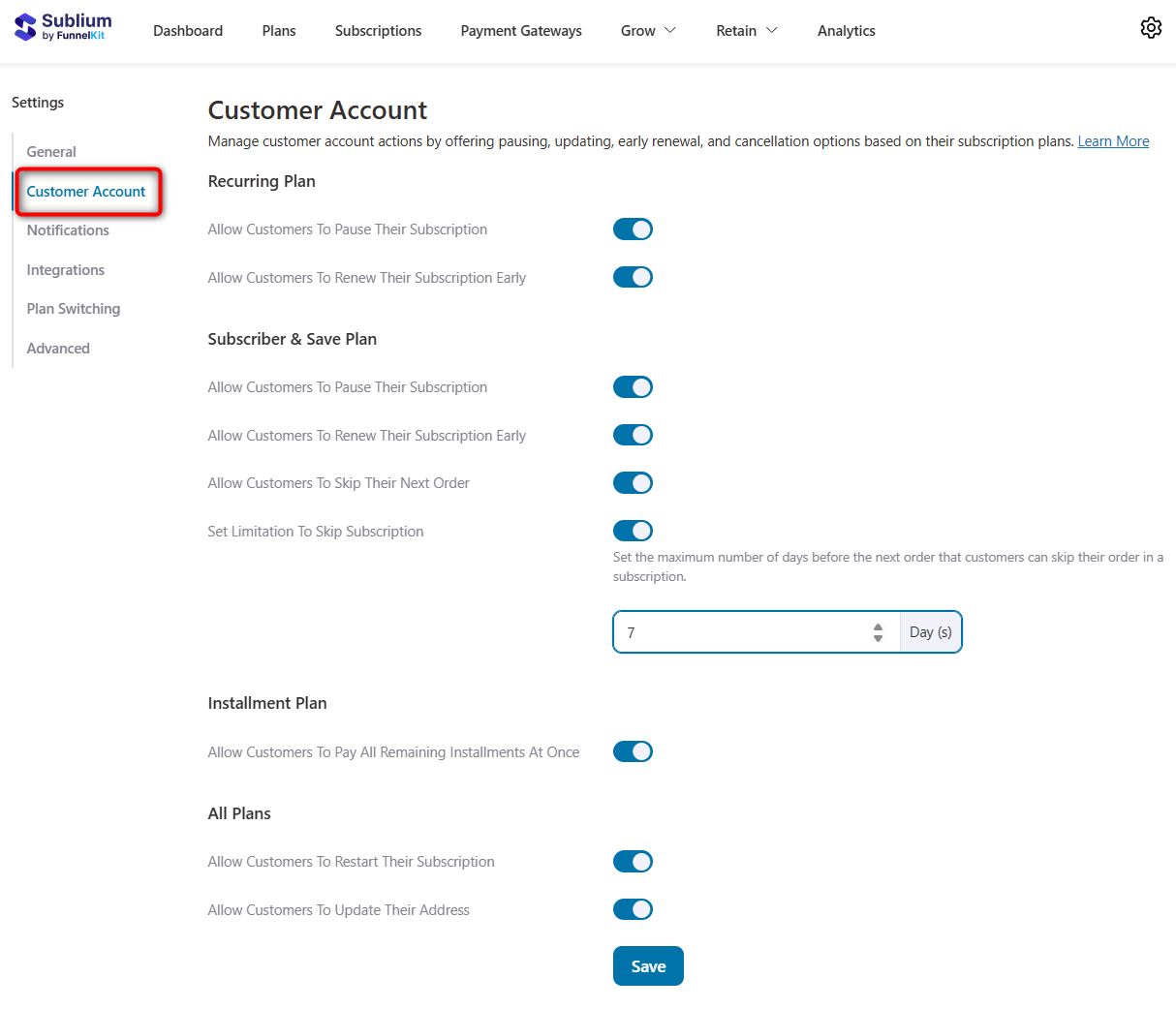
From here, enable or disable specific self-service actions based on your business rules and subscription structure:
Recurring plan
Let customers manage day-to-day subscription lifecycle tasks:
- Pause subscriptions: Allow users to temporarily stop their subscription instead of canceling altogether.
- Renew subscriptions: Give customers control to renew early when needed.
Subscribe & save plan
Ideal for replenishment items or consumables:
- Pause subscriptions: Enable customers to pause their product deliveries at their convenience.
- Renew subscriptions: Allow customers to renew their delivery subscriptions as needed.
- Skip next order: Reduces churn by giving customers flexibility when they don’t need the next shipment.
- Set limitations to skip subscriptions: Prevent overuse by defining how often users can skip (the maximum number of days customers can skip their subscription before the following order).
Installment plan
Perfect for higher-ticket products paid in parts:
- Pay the remaining installments all at once: Customers can clear their balance early if they choose.
All plans
These apply universally across all subscription types:
- Restart their subscriptions: Let users reactivate a canceled or paused subscription without contacting support.
- Update their addresses: Reduce failed deliveries and shipping issues by letting customers update their details anytime.
Once you’ve set up the permissions, click ‘Save’ to apply your changes.
Step 7: Manage your subscribers in WooCommerce
Once your subscription system is live, you need a clear way to view, filter, and manage all subscribers in one place.
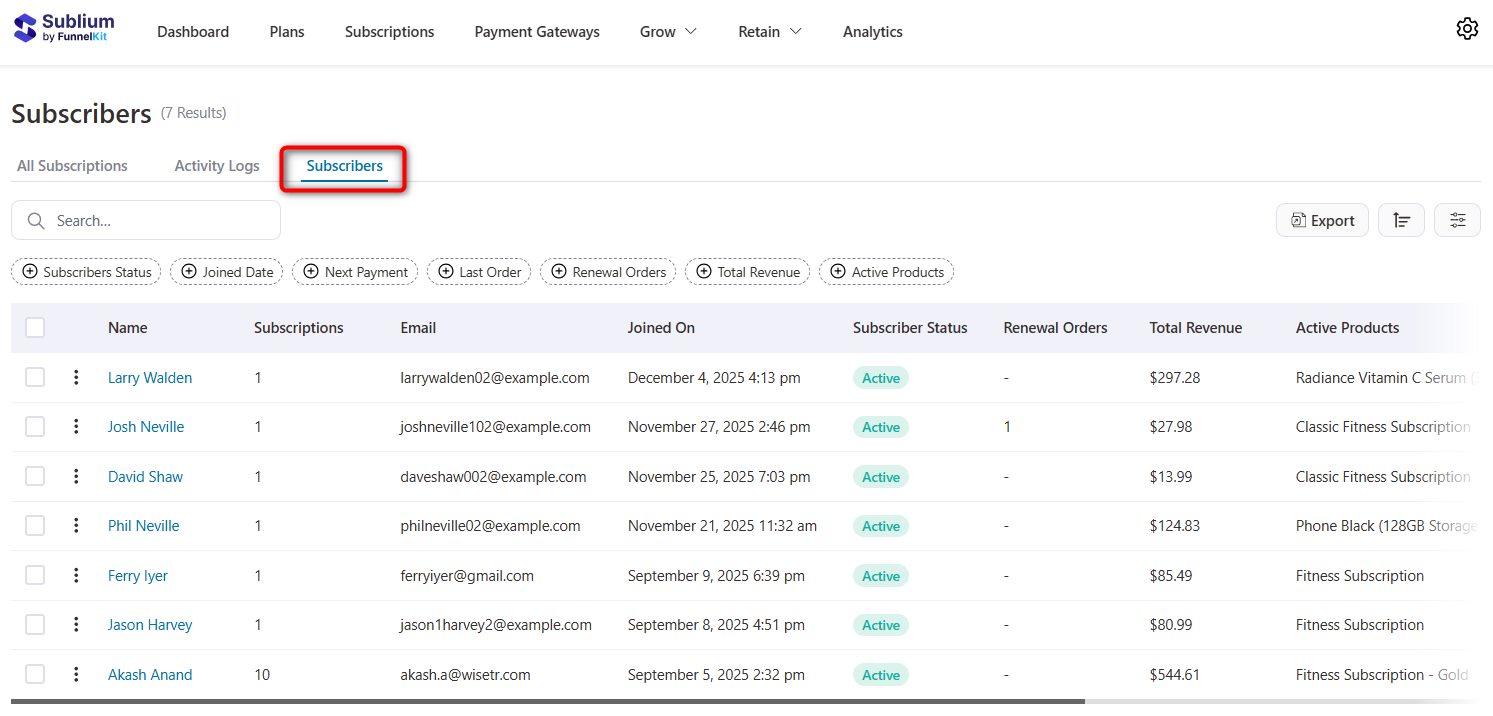
Sublium gives you a dedicated Subscribers dashboard to track all active, paused, cancelled, and upcoming subscription records in real time.
To access it, go to Sublium ⇨ Subscriptions ⇨ Subscribers
Here, you’ll see an organized table with details such as:
- Subscriber Name & ID
- Subscription status (Active, Paused, Cancelled, Expired)
- Billing amount and frequency
- Products included in the subscription
- Plan type (Recurring, Subscribe & Save, Installments)
- Start date / Next payment date / Last order date
- End date (if applicable)
- Total orders generated
The dashboard looks like this:
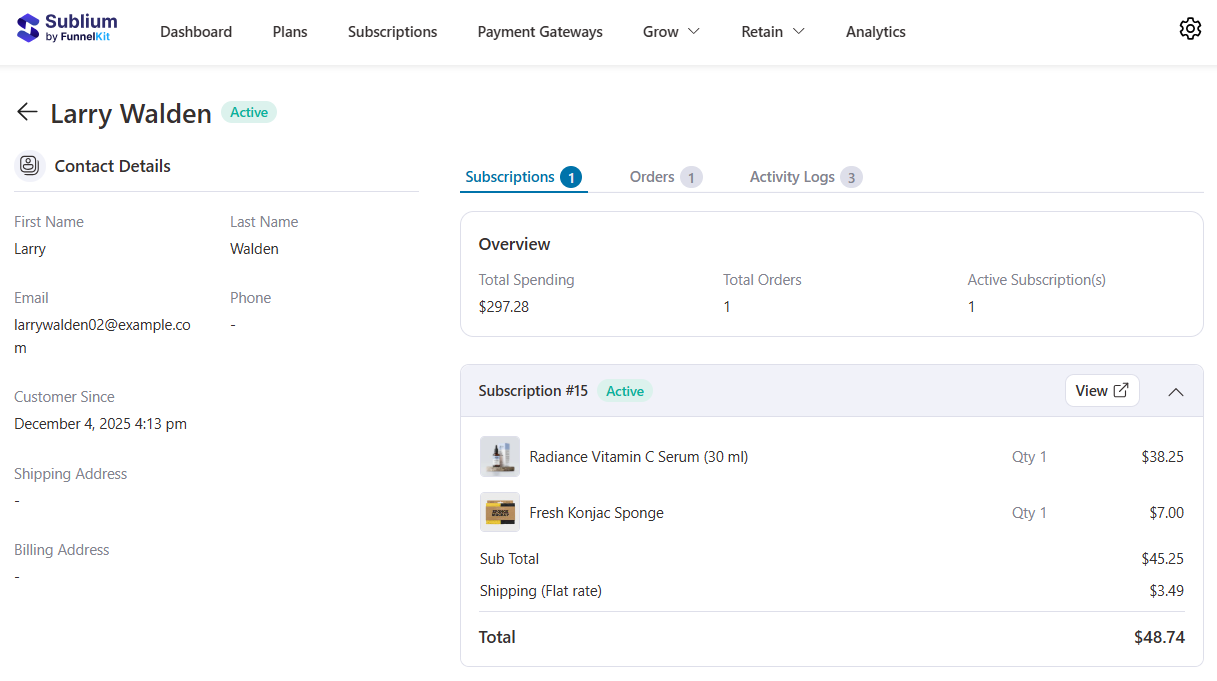
When you click on any subscriber in the list, Sublium opens a full, detailed profile that helps you understand their complete subscription history and engagement at a glance.
This is where you can see every interaction the customer has had with your store.
A subscriber profile includes contact details, subscription details, and an account overview with total spending, number of orders, active subscriptions, and more.
Step 8: Track real-time subscription analytics
Data is the backbone of a successful subscription business. Sublium provides real-time analytics that help you monitor performance, spot trends, and make informed decisions to grow recurring revenue.
With Sublium Analytics, you can track key metrics, including:
- Monthly recurring revenue (MRR): See how much revenue your subscriptions generate every month.
- Annual recurring revenue (ARR): Understand your long-term revenue potential.
- Churn rate: Identify cancellations or involuntary churn from failed payments.
- Subscriber growth: Track new subscriptions, upgrades, downgrades, and reactivations.
- Upcoming revenue: Forecast revenue from renewals and forthcoming billing cycles.
- Upgrade groups and payment recovery: Monitor which plan switches and payment recoveries are driving growth.
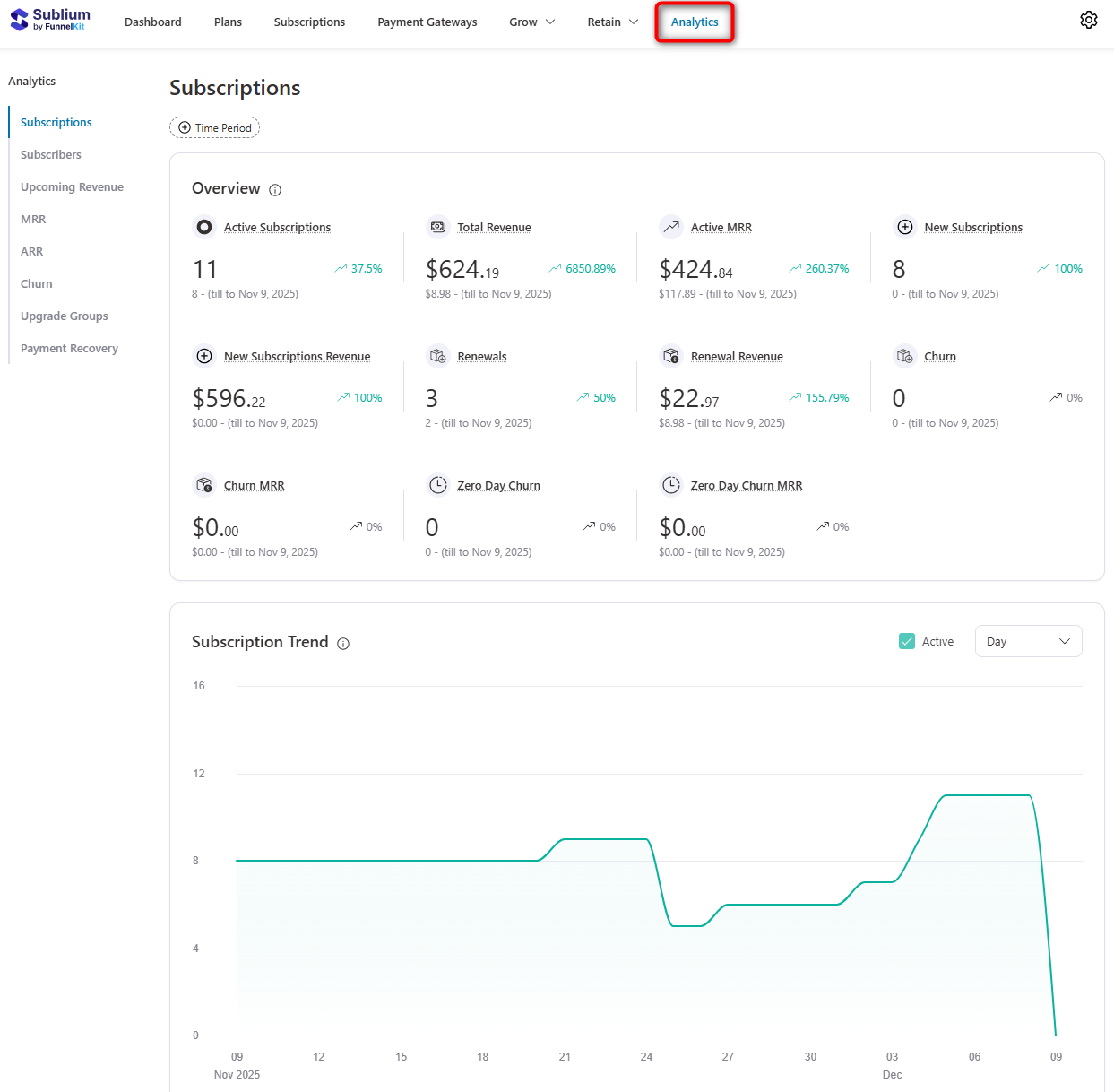
Sublium makes it easy to filter reports by time period, subscription type, or plan, giving you a clear view of what’s working and where improvements are needed.
By monitoring real-time analytics, you can proactively optimize your pricing, billing cycles, email campaigns, and customer retention strategies to ensure your subscription business scales efficiently.
Customer Experience: Managing Existing WooCommerce Subscriptions
Once your subscriptions are up and running, the real work begins: keeping them smooth, flexible, and profitable. With Sublium, managing existing subscriptions becomes simple and stress-free.
Here’s how you can handle the key tasks effortlessly:
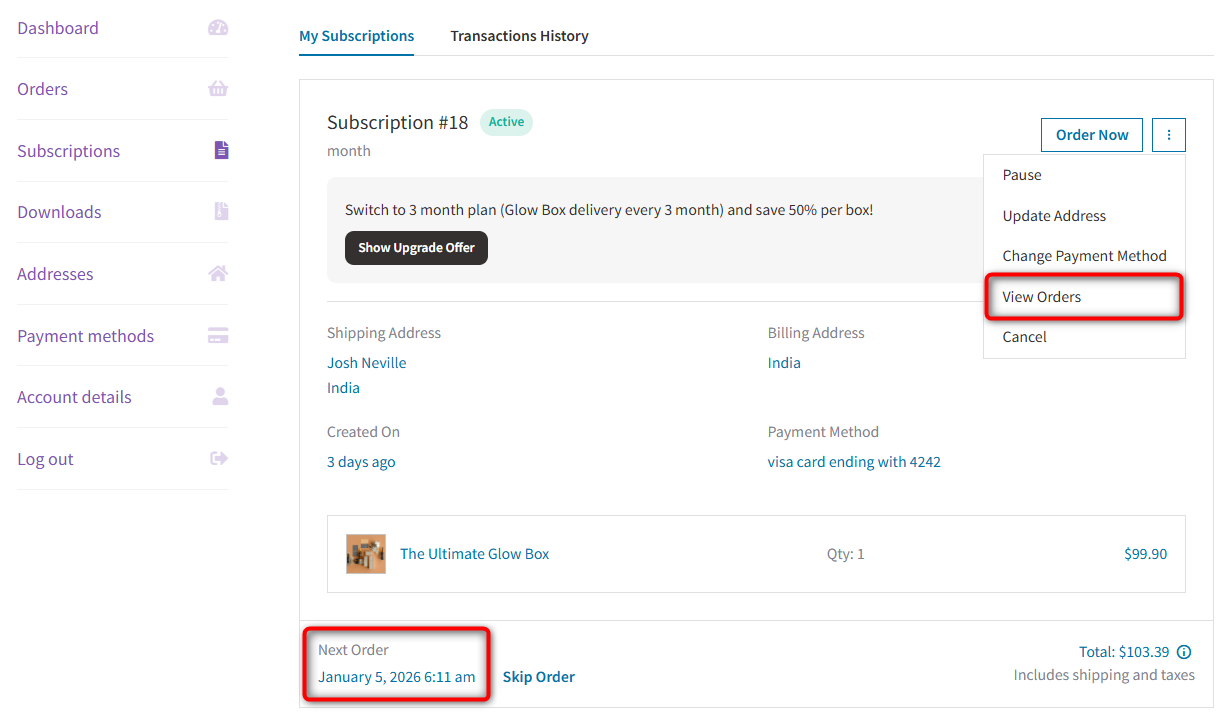
1. View and track subscriptions
Sublium gives you a clear dashboard of all active, paused, or cancelled subscriptions in WooCommerce.
You can quickly see which subscription is about to renew, which one has expired, or track an order.
2. Edit subscription details
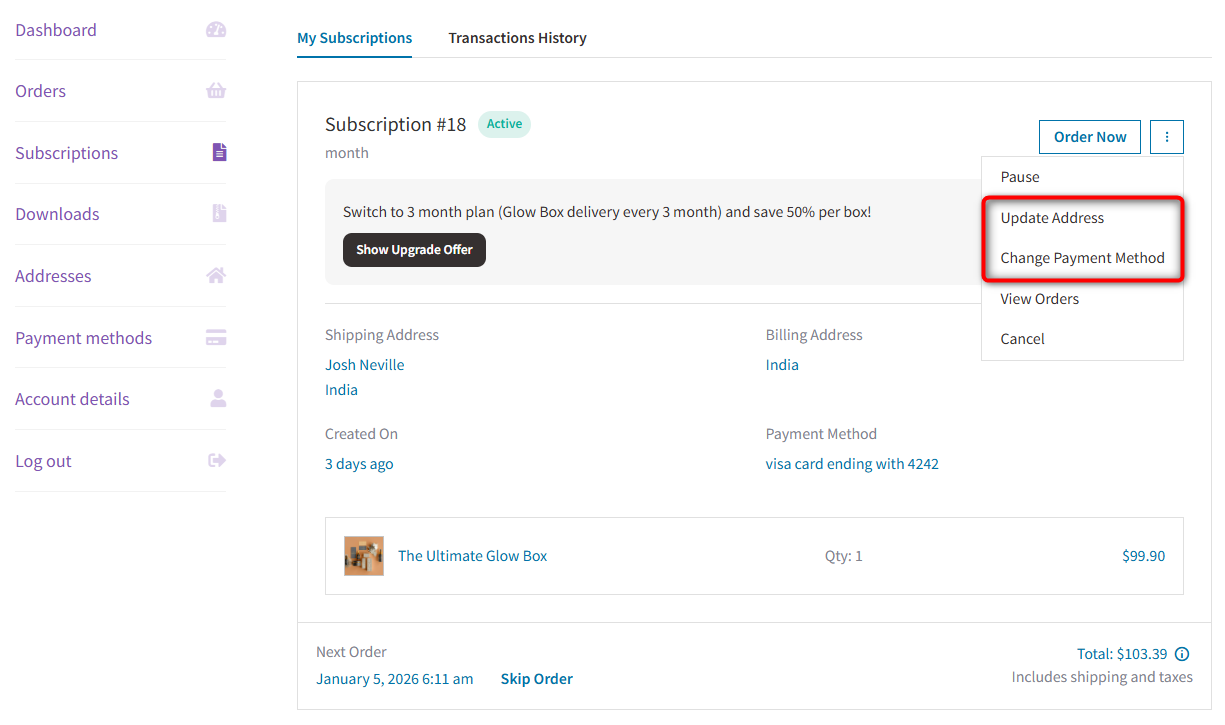
Need to update the address or change the payment method? Sublium makes it simple to modify these details without breaking the recurring schedule.
3. Upgrade or downgrade plans
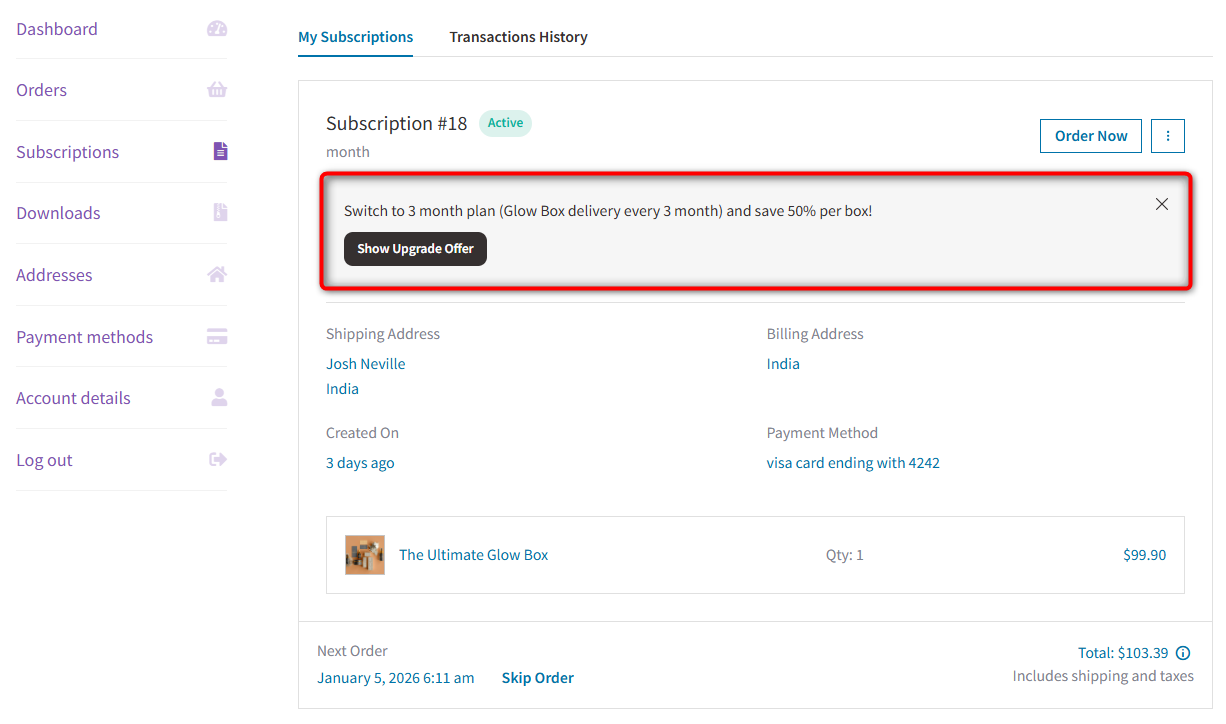
Customers can move between plans mid-cycle, and Sublium automatically calculates proration.
This ensures fair billing while giving your subscribers the flexibility they want.
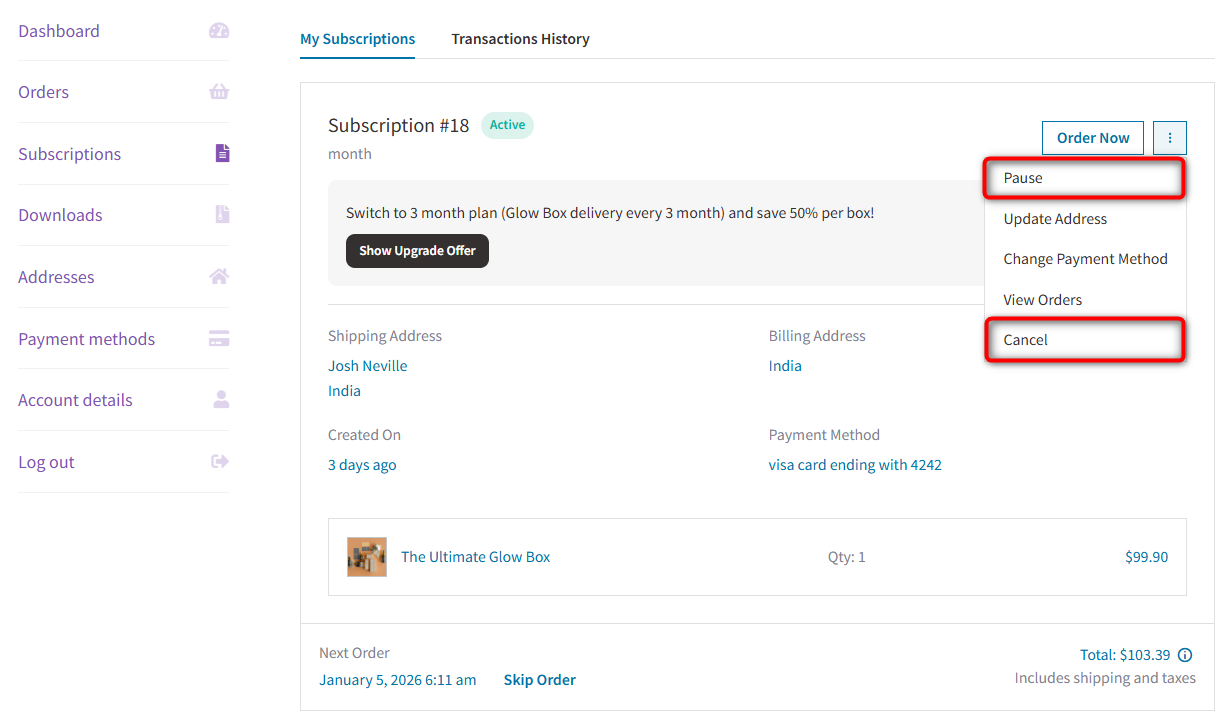
4. Handle pauses and cancellations
Sublium allows customers to pause subscriptions or cancel them gracefully.
5. Manage failed payments
Failed payments are a common pain point. Sublium automates retries and sends reminders, so you recover revenue without manual follow-ups.
You’ll automatically receive failed email notifications to recover payments with a CTA button to try with another payment method.
6. Keep subscribers informed
Automated emails notify customers about renewals, failed payments, upgrades, or plan changes, keeping your communication timely and professional.
7 Best Practices for Effectively Managing Your WooCommerce Subscriptions
Managing subscriptions is about building a predictable, low-friction, high-retention revenue engine. Follow these proven best practices to keep your subscription model healthy, scalable, and profitable.
1. Keep billing cycles simple
Complex billing creates confusion, which leads to churn.
Stick to clear, predictable cycles such as monthly, quarterly, and annual. Customers should instantly understand when they’ll be charged and for how much.
Simple billing also reduces support headaches since there are fewer questions about renewals, proration, and mid-cycle changes.
2. Offer subscribe & save discounts
Nothing boosts recurring signups like a compelling incentive.
Even a 5% to 10% discount can dramatically increase subscription adoption. Shoppers love locking in savings, and “Subscribe & Save” programs set clear expectations: join once, save forever.
This works exceptionally well for consumables, membership access, coaching programs, and software-style services.
3. Give customers the power to change plans
If customers can’t upgrade, downgrade, pause, or skip a cycle, they’ll choose the only option they have left: cancel.
Empower subscribers with a self-service portal where they can move between plans anytime, update billing information, pause or skip orders, and more.
Flexible control = higher retention and reduced support workload.
4. Automate subscription renewal reminders
Customers should never be surprised by a charge.
Send pre-renewal emails at least 3-7 days before each billing date. This builds trust and reduces disputes or chargebacks.
Pair this with post-renewal confirmations to ensure subscribers always feel in control of their payments.
5. Track churn and cancellation reasons
Every cancellation teaches you something. Collect simple, one-click feedback when subscribers cancel.
Common reasons include “Too expensive”, “Not using it enough”, “Found an alternative”, or “Billing issues”.
Knowing why customers leave helps you fix the root problem, whether that’s better pricing, better value, or better communication.
6. Use analytics to forecast MRR and business growth
Subscription businesses thrive on predictability.
Track metrics like MRR (Monthly Recurring Revenue), ARR (Annual Recurring Revenue), churn rate, upgrade/downgrade trends, and failed payment recovery rate.
When you know these numbers, you can forecast revenue, spot problems early, and make better marketing decisions.
7. Reduce friction during signup
Every extra field on your WooCommerce checkout form costs you conversions.
Keep forms short, remove unnecessary fields, use address autocompletion, enable guest checkout, etc., to maximize subscription signups.
Sublium integrates deeply with FunnelKit Funnel Builder to create high-converting checkout pages and entire sales funnels.
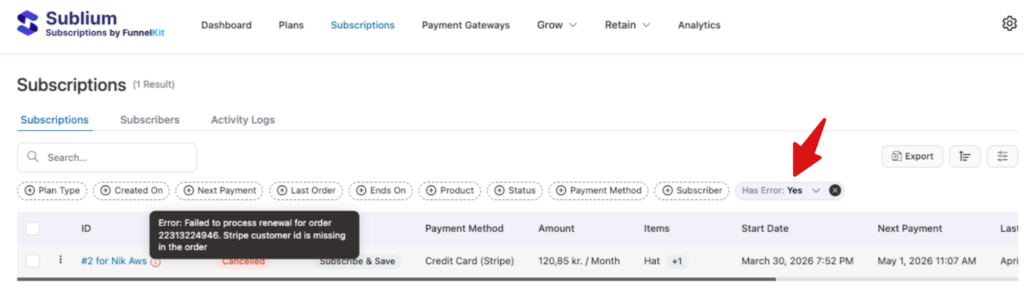
8. Monitor your subscriptions for errors
A failed renewal you don’t catch is revenue quietly slipping away.
Keep an eye on your active subscriptions, and you can spot the ones with errors right away, usually an expired card or a declined payment. Catch it early, recover the charge, and the customer stays put.
For any subscription-related issue, feel free to contact our support team. And if you need a hand keeping your WooCommerce store in good shape, use Seahawk Media’s maintenance service to handle the ongoing upkeep so you don’t have to.
Frequently Asked Questions (FAQs) Related to WooCommerce Subscription Management
Can I manage WooCommerce subscriptions for free with Sublium?
Technically, yes, but with significant limitations. You can create a simple recurring product using Sublium, but you will be charged a 1.9% fee per-subscription transaction + standard gateway fees (which is merely a small amount).
To remove this fee and unlock premium features like automated billing, dunning (retrying failed payments), and customer self-service portals, use Sublium Pro for a scalable business model.
Which payment gateways are best for WooCommerce subscriptions?
Stripe and PayPal are the industry standards because they support “tokenization” (saving cards securely) and automatic recurring billing.
Other strong options include Square, Authorize.net, and Mollie. Avoid gateways that require customers to log in manually to pay each month, as this drastically increases churn.
How do I handle failed subscription payments in WooCommerce?
The best way is to set up an automated “dunning” sequence. This involves automatically retrying the payment card 3-4 times over a week and sending email reminders to the customer to update their billing details. Sublium is an excellent subscription plugin that automatically handles this logic for you.
Can I allow customers to pause their subscription instead of cancelling?
Yes, you can enable customers to pause and disable subscription cancellation in Sublium’s customer account action settings. Allowing a “Pause” (or suspension) is a top retention strategy. It lets customers take a break (e.g., for vacation) without severing the billing relationship.
When they resume, the revenue stream continues automatically, whereas a cancelled customer has to be re-acquired.
How do I handle taxes for subscription products?
Taxes are calculated at the time of renewal using the customer’s saved address and your WooCommerce tax settings. Ensure your tax rates are updated and location-based tax rules are correctly enabled to avoid billing errors.
Should I offer discounts for long-term subscription plans?
Definitely, annual or semi-annual discounts increase retention and cash flow. Many stores see 20-40% higher LTV when they offer a “pay yearly and save” option.
Can I sell both one-time and subscription versions of the same product?
Yes. Sublium lets you offer a “Subscribe & Save” option so customers can choose between a one-time purchase and recurring delivery. This increases conversions and encourages long-term revenue.
Take Full Control of Your WooCommerce Subscriptions
Managing subscriptions isn’t just about making recurring sales. It’s about building a predictable, scalable, and low-friction business engine.
When your billing cycles are clear, your dunning is automated, and your customers can manage their own plans, the chaos disappears. Everything just works.
WooCommerce gives you the foundation, but proper subscription management requires the right system. The one that handles upgrades, downgrades, pauses, and failed payments without breaking your store or overwhelming your support team.
That’s exactly what Sublium is built for.
Sublium consolidates the entire subscription lifecycle into one powerful platform. From flexible billing and automated revenue recovery to customer-friendly plan switching and real-time analytics, it gives you the tools to eliminate churn and grow MRR with confidence.
If you are serious about scaling a subscription business on WooCommerce, don’t settle for duct-taped solutions or manual workflows.
Choose a subscription engine that helps you convert more customers, retain them longer, and run your store with complete clarity.
Ready to stop leaving money on the table? Try Sublium today and start building predictable, high-retention revenue.


