


Churn kills subscription stores, but a targeted WooCommerce subscriptions coupon changes this math.
You can slash the recurring price every billing cycle or waive the initial sign-up fee entirely to get hesitant buyers through the door.
The only roadblock is that WooCommerce does not support subscriptions or subscription-specific coupons out of the box.
You need a dedicated subscription plugin to unlock coupon types like recurring product discounts and sign-up fee discounts.
Without these coupon types, a standard WooCommerce coupon only applies to the first payment and does nothing for renewals.
After setting this up for dozens of high-volume stores, we found that the right discount structure makes or breaks retention.
In this guide, we will show you how to create WooCommerce subscription coupons without code.
Instead, we will walk through exactly how to build these coupons, six proven promotional setups we use to acquire users, and the exact retention tactics that keep them paying month after month.
Types of WooCommerce Subscription Coupons
WooCommerce, by default, offers basic cart and product discounts. That works fine for t-shirts, but fails completely when you need to manage a $50/month subscriber base.
To actually change the economics of your recurring revenue, you need the four specific discount architectures that a dedicated subscription plugin unlocks.
1. Recurring product (flat and percentage) discount coupon
A recurring product discount coupon reduces the recurring payment amount by a fixed dollar value or a percentage.
Rather than just hitting the initial checkout, this coupon permanently reduces the cost of every single renewal payment for the life of the subscription.
Let’s say a customer buys into your $30/month tier. Hand them a $10 recurring discount code, and their price drops to $20/month indefinitely.
The caveat is that this discount will not touch your sign-up fees at all. It targets the recurring revenue line exclusively.
Deploy these for ongoing promotions, VIP loyalty rewards, seasonal discounts for long-term subscribers, or partner deals that permanently reduce the rate.
2. Sign-up fee discount
A sign-up fee discount reduces or eliminates the one-time sign-up fee on a subscription product. It does not affect the recurring payment amount.
If you charge a $50 setup fee in addition to a $25 monthly rate, the initial $75 can scare off cold traffic.
A sign-up fee discount wipes out that initial barrier completely while protecting your long-term monthly margins. They pay $25 today. They pay $25 next month. Zero or discounted setup cost.
This setup often creates the highest-converting promotions for new customer acquisition.
It lets you run aggressive Black Friday or launch campaigns without permanently devaluing your core product offering.
3. Limited payment cycles
Users constantly ask about the setup, like “How do I offer 20 percent off, but only for the first two months?”
You do it by capping a recurring discount. By setting the ‘Active for x payments’ value inside the coupon configuration, you control exactly when the promotion expires.
Enter 3, and the system automatically removes the discount from the user’s account right before their fourth billing cycle.
No manual intervention needed. The subscriber simply bumps back up to full price.
Use limited payment cycles for introductory offers and aggressive win-back campaigns aimed at churned users.
4. Standard cart and product coupons
You can still offer standard WooCommerce coupon codes for subscription products. Just know their limitations.
This basic cart coupon applies only to the first transaction. Nothing carries over to the renewal.
You have absolutely zero control over how the discount applies across the order, meaning the system will automatically apply your sign-up fee before it even touches the initial monthly payment.
Use these coupons for initial purchases or during sitewide flash sales that include both your subscription and non-subscription products.
How to Create a WooCommerce Subscription Coupon Without Code
To create subscription coupons in WooCommerce, you first need a subscription plugin installed.
We will use Sublium, a WooCommerce subscription management plugin that supports recurring billing, subscriber self-service, payment recovery, and recurring product discount coupons (both flat and percentage).
Beyond coupons, Sublium also lets you set built-in discounts directly on your subscription plans. This means you can offer subscribe-and-save pricing, introductory rates, and plan-level discounts without needing a coupon code at all.
It offers a free version that includes features such as selling recurring plans, managing subscriptions, recovering failed payments, and more.
The Pro plan adds a cancellation flow to reduce churn and analytics for tracking MRR and subscriber lifetime value.
Follow the step-by-step instructions below to create a WooCommerce subscription coupon:
Step 1: Install Sublium and create a subscription plan
Install and activate Sublium on your WordPress site.
Once activated, go to Sublium ⇨ Plans and create a subscription plan to the product by configuring the billing frequency (weekly, monthly, yearly, or custom), the recurring price, and optionally a sign-up fee or free trial period.
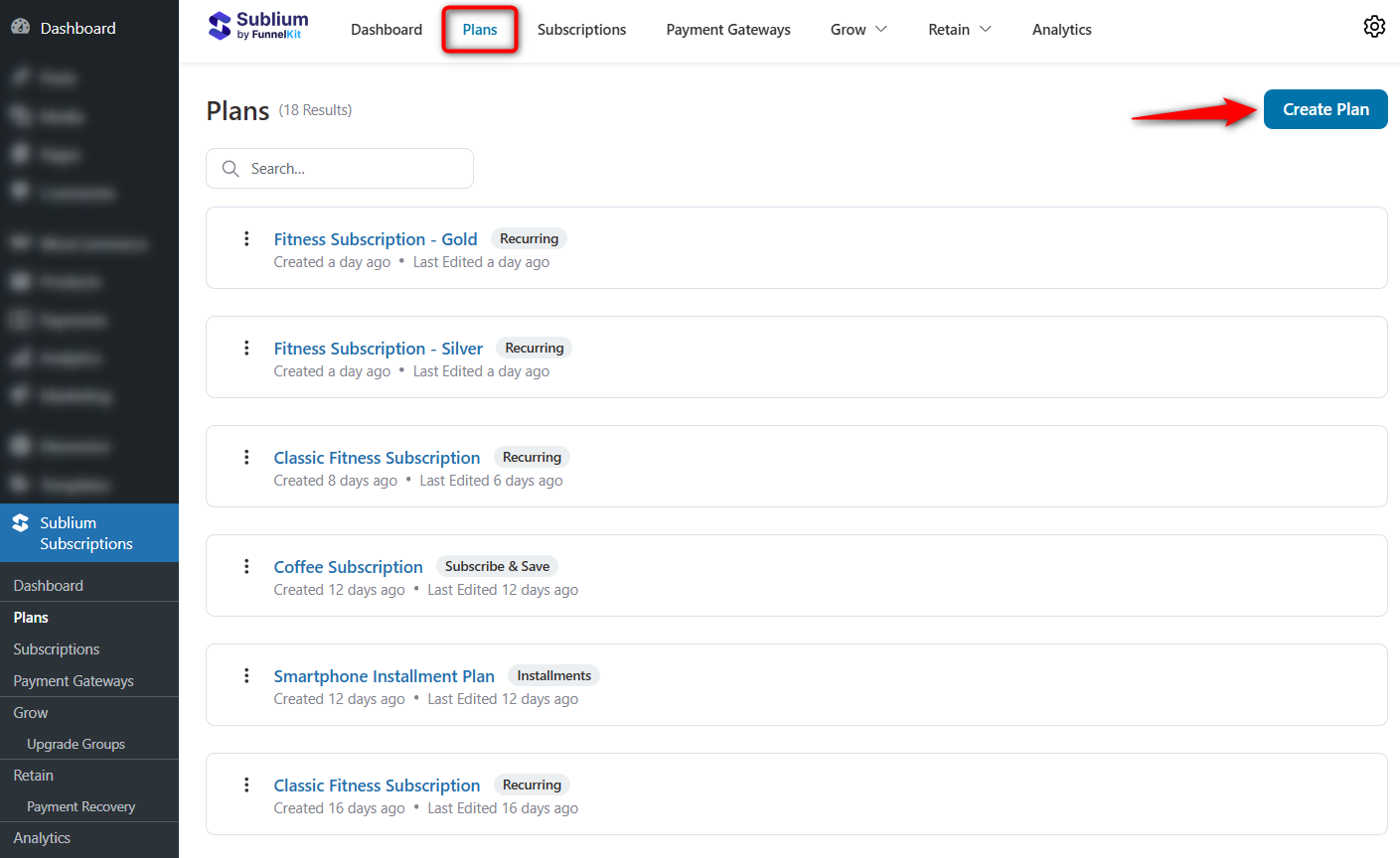
Sublium lets you add multiple subscription plans to a single product, so you can offer monthly and annual options side by side.
Check our step-by-step guide on how to sell subscriptions in WooCommerce here.
Step 2: Create a new recurring coupon
Navigate to WooCommerce ⇨ Coupons in your WordPress dashboard and click Add coupon.
Enter a coupon code that your customers will use at checkout. Choose a descriptive code that is easy to remember, such as “SAVE20” or “SUBSCRIBE10”.
In the Coupon data section under the General tab, select the discount type.
With Sublium active, you will see Recurring Product Discount and Recurring Product % Discount options in addition to the standard WooCommerce coupon types.
Choose the flat option to reduce each renewal by a fixed dollar amount, or choose the percentage option to discount each renewal by a percentage of the recurring price.
Enter the coupon amount, either a fixed dollar value or a percentage, depending on the discount type you selected.
Enable free shipping on the coupon if your subscription products include shipping costs. Set an expiry date if the coupon should only be redeemable before a certain date.
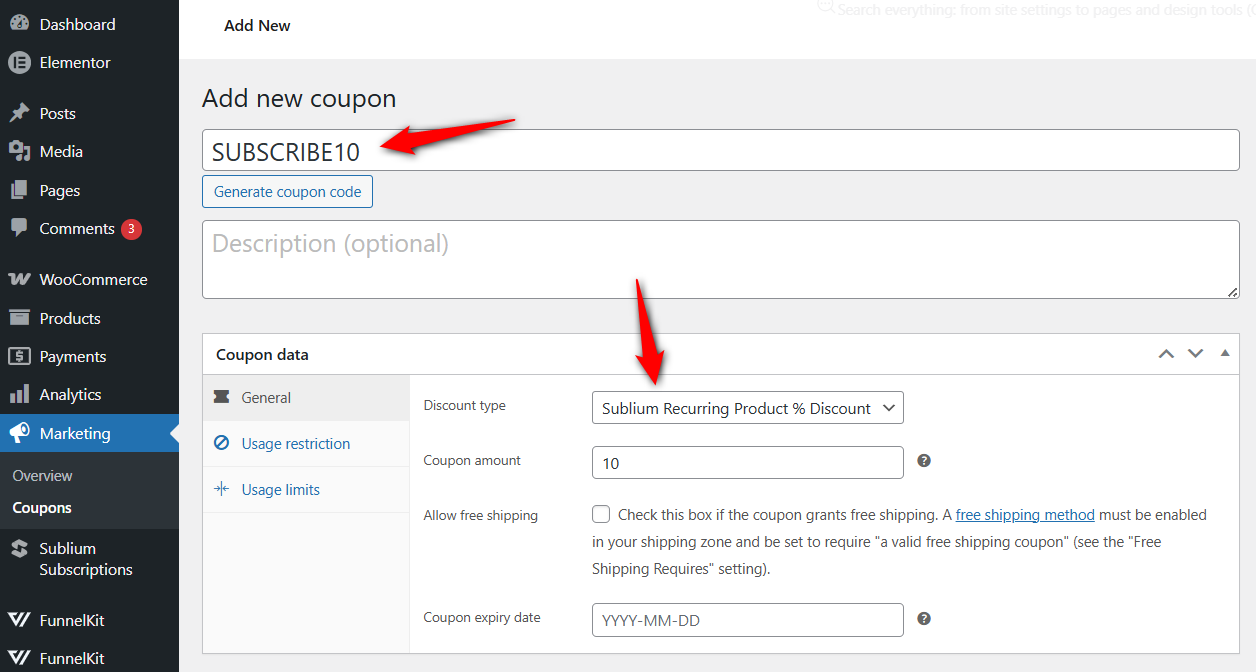
This coupon applies to every renewal payment for the life of the subscription.
Step 3: Configure the subscription coupon settings
Configure usage restrictions under the Usage restriction tab, such as a minimum spend, specific product restrictions, or email-based limits for new customers only.
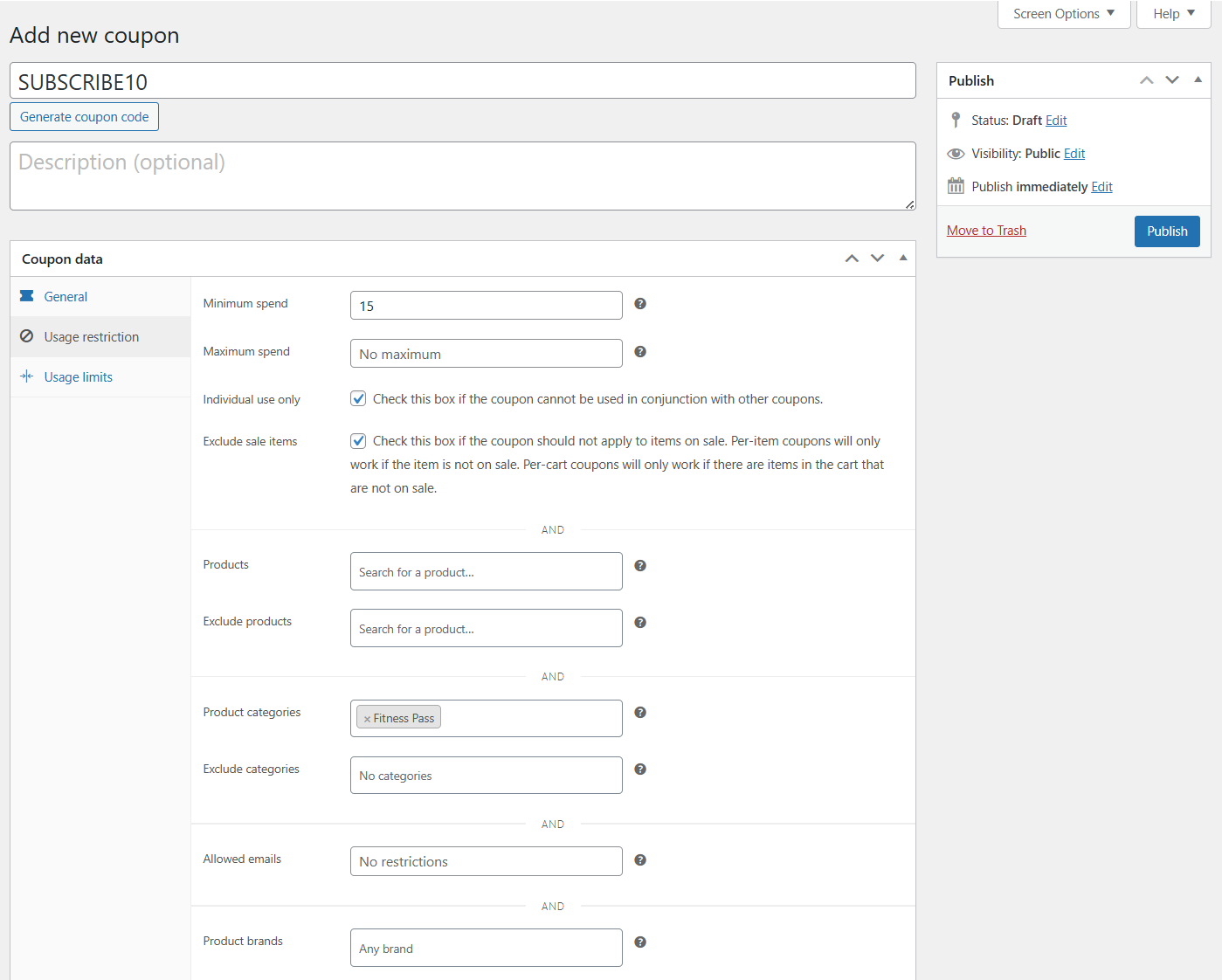
If you want to offer a discount only for the first few billing cycles rather than all renewals, Sublium’s plan-level discounts are a better fit than a coupon.
When creating or editing a subscription plan in the product settings, you can set a discounted price that applies for a defined number of cycles.
The subscriber sees these savings directly on the product page without needing to enter any code. This built-in approach is more effective for introductory offers because it eliminates the risk that customers will forget to apply a code at checkout.
Step 4: Publish and test the coupon
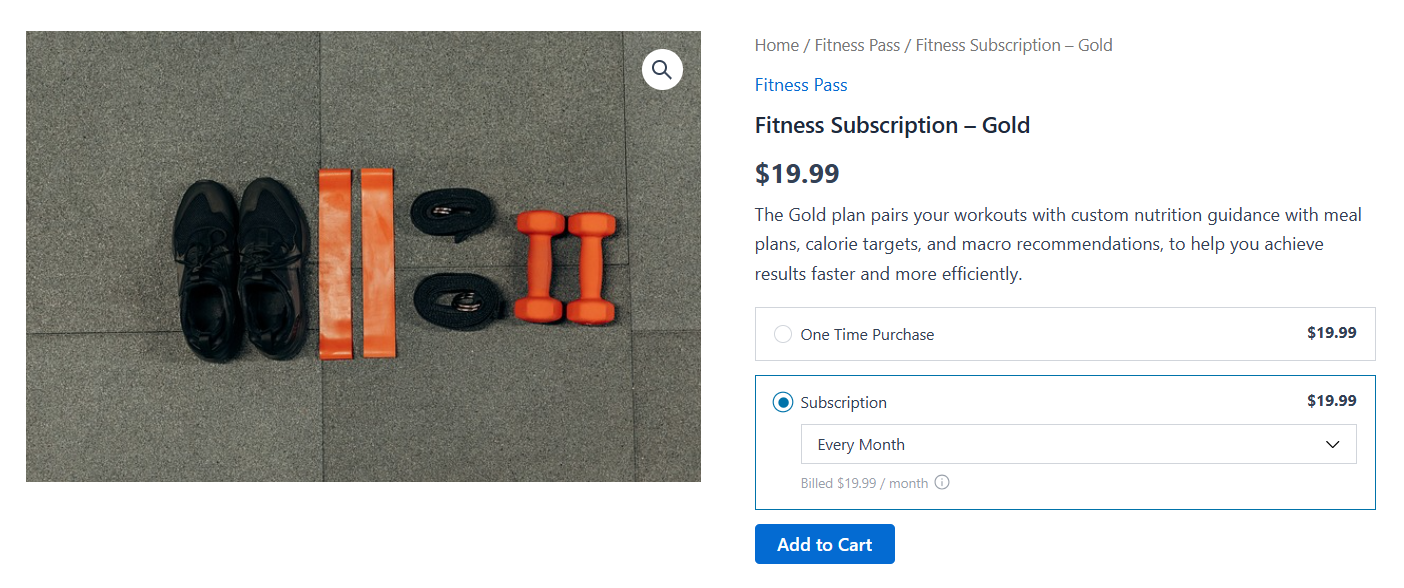
Click ‘Publish’ to make the coupon live. To test, go to any subscription product page on your store and add it to the cart.
Proceed to checkout and apply the coupon code. Verify that the discount is applied correctly.
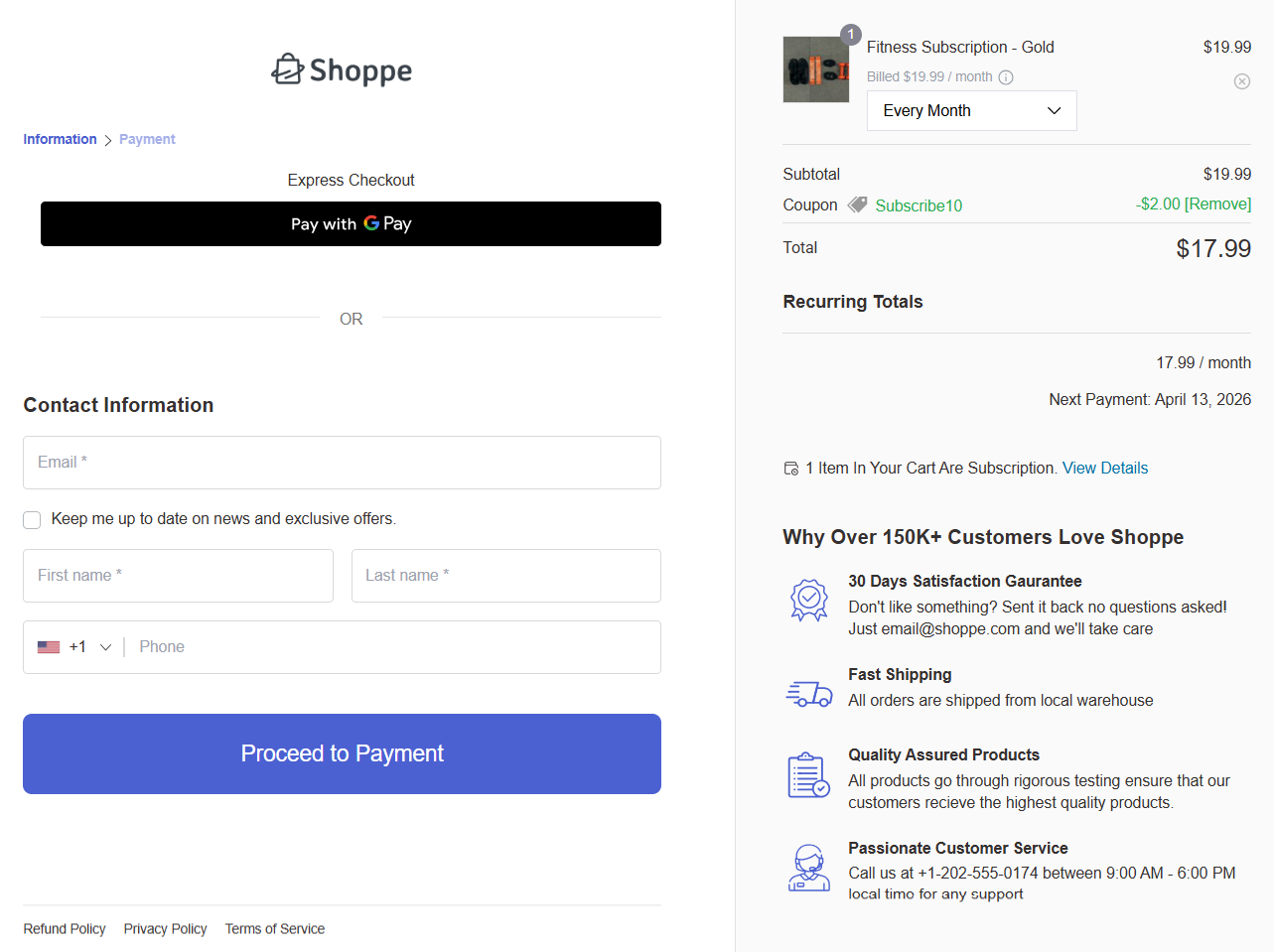
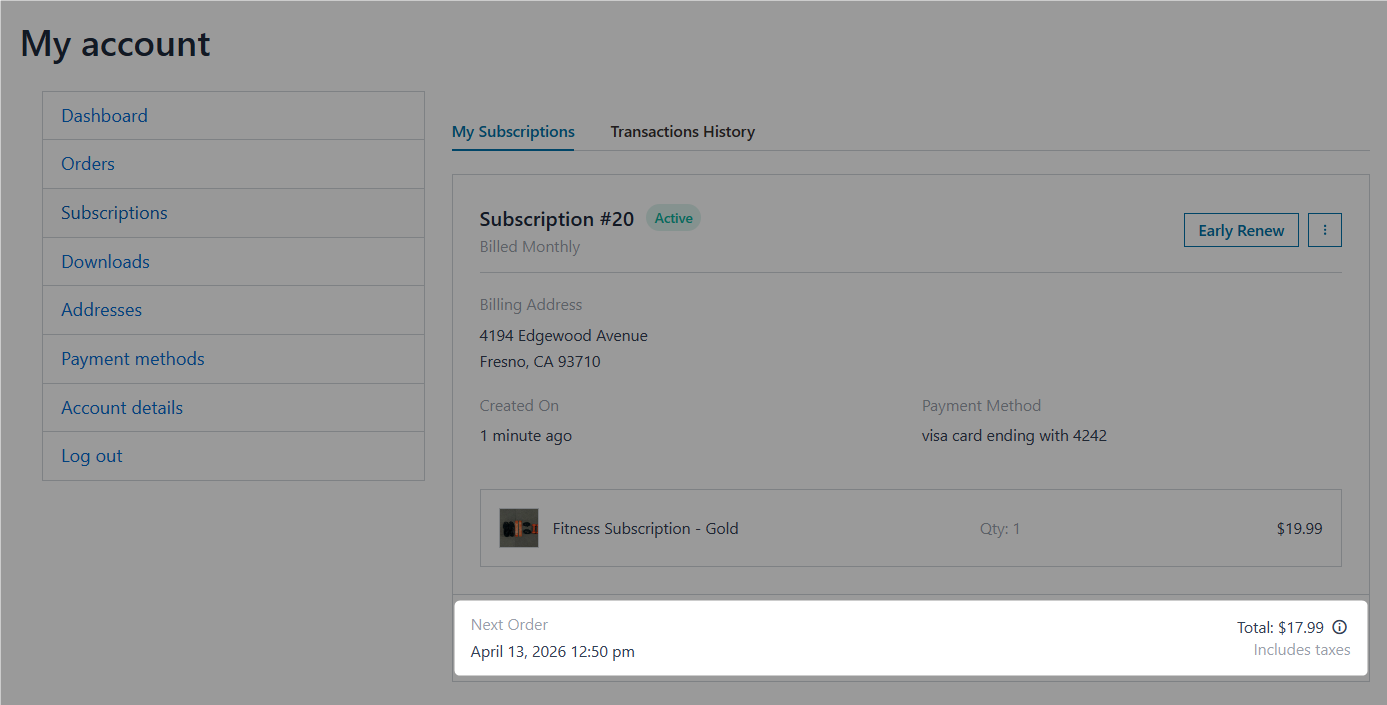
If you created a recurring discount, check that the renewal amount shown at checkout reflects the discounted price.
Test on both desktop and mobile devices to make sure the coupon field is visible and the discount summary displays correctly on smaller screens.
7 Ways to Get More Revenue From WooCommerce Subscription Coupons
You do not need more traffic to increase your monthly recurring revenue. You just need to stop losing the people who already added a subscription to their cart but balked at the final price.
Here’s how you can get more revenue from subscription coupons in your WooCommerce store.
1. Offer a first-month discount to convert hesitant shoppers
Let’s skip the standard coupon code entirely. For stores running Sublium, plan-level introductory pricing outperforms manual codes.
Why? Because it removes friction.
When you configure a lower price for the first billing cycle directly in the plan settings, the customer sees “$9.99 for the first month, then $19.99/month” right on the product page.
They do not have to hunt for a promo code. They just click buy.
According to Marketing LTB, 49% of consumers subscribe specifically because of low-cost introductory offers, so time-limited discounts capture this intent without permanently tanking your margins.
If you use a different plugin, you mimic this by setting a limited-payment coupon to exactly one billing cycle.
2. Incentivize annual plan upgrades with a percentage discount
If you sell both monthly and yearly subscription plans, create a recurring-product percentage-discount coupon that applies only to the annual plan.
For example, offering a 15% recurring discount coupon limited to the annual product variation gives your monthly users a constant, visible reason to upgrade their plan.
Use the coupon’s product restriction settings to limit it to the annual variation only, so monthly subscribers cannot use it.
Sublium handles this natively by letting you set the base annual price lower without touching coupon logic, keeping the savings displayed automatically on the product page.
3. Create targeted coupons for digital goods and membership subscriptions
WooCommerce subscription coupons work with virtual and downloadable products, not just physical goods.
If you sell online courses, premium content access, or software licenses on a recurring subscription basis, a recurring product discount coupon can reduce the ongoing cost to incentivize sign-ups.
For stores that charge a one-time sign-up fee, subscription plugins like WooCommerce Subscriptions offer a dedicated sign-up fee discount coupon type to waive or reduce that upfront cost.
For stores using WooCommerce Subscriptions alongside a membership plugin, keep in mind that membership access is typically controlled separately.
4. Combine subscription coupons with win-back and loyalty campaigns
When a subscriber cancels or shows signs of churn, such as pausing, skipping a delivery, or contacting support about canceling, trigger an automated email sequence with a renewal coupon attached.
Behavioral email triggers like these can lift retention by 10 to 25%, depending on the cadence and offer.
Use cancellation flows to intercept exits, reinforce value, and present personalized offers that keep your subscribers engaged.
You can also use automation tools like FunnelKit Automations or AutomateWoo to generate a unique coupon code for each subscriber after every renewal, rewarding active subscribers with a monthly perk without code reuse.
Subscription businesses that use proactive interventions based on customer health scores reduce churn by 16-28%.
A/B test different coupon structures within these automations, comparing percentage versus fixed discounts or 1-month versus 3-month offers, and track which type generates the highest retention after the promotional period ends.
5. Set usage restrictions to prevent coupon abuse
Limit each coupon to one use per customer, restrict it to specific products or categories, and set an expiry date.
You can also restrict coupons to new customers only by using email-based usage limits.
Your promotional budget needs to acquire new revenue, not subsidize people who were already going to buy anyway.
6. Use referral coupons to turn subscribers into acquisition channels
Current subscribers are your cheapest acquisition channel.
Give them a personalized referral code. When their friend subscribes, both accounts get a discount. It is a simple loop.
Double-sided incentives turn a static subscriber base into an active growth engine.
7. Offer student or segment-specific subscription deals
Sometimes you need to offer a massive discount that you absolutely do not want the general public to see. Think of student pricing or corporate partner perks.
Create a coupon restricted to specific customer email domains (like .edu addresses) or user roles to offer targeted subscription discounts.
This lets you capture highly specific market segments without devaluing your public pricing tiers. Audit your subscriber list to see which corporate domains keep popping up.
Frequently Asked Questions on WooCommerce Subscriptions Coupon
How do I offer 20% off the first 2 months of a WooCommerce subscription?
There are two approaches. If your subscription plugin supports limited payment coupons (like WooCommerce Subscriptions), create a recurring product percentage discount coupon, set the amount to 20, and enter 2 in the “Active for x payments” field. The coupon applies to the first 2 billing cycles and is automatically removed after that.
Alternatively, with Sublium, you can configure an introductory discounted price directly on the subscription plan. The subscriber sees the lower rate on the product page and automatically transitions to the full price after the defined number of cycles, with no coupon code required.
Can I apply a coupon only to subscription renewals, not to the initial payment?
WooCommerce does not offer a renewal-only coupon type by default. To make this work, you need a dedicated add-on, such as the Renewal Only Coupon extension on GitHub. You can also use marketing automation tools such as FunnelKit Automations or AutomateWoo to apply coupons to subscriptions after the initial payment is processed.
Can I use multiple coupons on a single WooCommerce subscription order?
WooCommerce, by default, allows only one coupon per order. If you really want to enable stacking, you have to install a third-party coupon management plugin that overrides the checkout logic. Be incredibly careful here because combined discounts can instantly wipe out profit margins.
Do subscription coupons work with free trials?
Recurring product discount coupons do not apply to the initial payment for a subscription with a free trial, since there is no charge during the trial period. The math kicks in the moment the first paid renewal is triggered. Sign-up fee discounts operate differently. If your trial period still requires an upfront initiation fee, the sign-up coupon will slash that initial cost immediately.
What is the difference between a subscription coupon and a membership coupon in WooCommerce?
A WooCommerce subscriptions coupon discounts the recurring payment amount or sign-up fee you collect from a buyer on a subscription. A membership coupon, on the other hand, typically discounts the purchase of a membership plan.
If you run Sublium subscriptions alongside a membership plugin, a recurring discount reduces the monthly charge, but it absolutely will not upgrade their membership tier or unlock new premium courses.
Can I get a refund if a subscription coupon was applied incorrectly?
Refunds for subscription orders work the same way as regular WooCommerce refunds. If a coupon was applied by mistake or the discount was incorrect, you can process a manual refund from the WooCommerce order page in your WordPress dashboard. For future renewals, simply remove the coupon from the subscription.
Start Using WooCommerce Subscription Coupons to Reduce Churn and Grow Revenue
Stop treating subscription coupons like standard flash sales. These coupons become a retention tool that reduces churn, increases lifetime value and turns one-time visitors into long-term subscribers.
We covered the four subscription coupon types available in WooCommerce, walked through the full setup process for recurring product discount coupons using Sublium.
We also shared seven strategies for turning coupons into a growth lever, from first-month introductory offers and annual plan incentives to automated win-back campaigns and referral-driven acquisition.
The plugin you choose to handle this matters, but your execution matters more because the stores that win with subscription coupons are the ones that treat them as part of a larger retention strategy.
If you want a core system that natively handles recurring discounts, introductory plan pricing, dunning management, smart cancellation flows with built-in analytics, give Sublium a try.


