


WooCommerce memberships and subscriptions are two different tools that store owners often confuse.
Memberships control who can access your content, products, or perks. Subscriptions handle recurring payments on a fixed schedule. They sound similar because both involve ongoing access, but they solve different problems.
The confusion matters because choosing the wrong one can lead to broken access, manual billing, or members who never get charged again.
Most stores that sell recurring access actually need both to work together.
In this guide, we will explain the difference between memberships and subscriptions in plain terms.
We will show you how the two work together to create recurring membership plans, walk through the setup, and cover what happens to member access when a payment renews, fails, or gets canceled.
We will also compare the leading plugins so you can choose the right stack for your store.
Memberships vs Subscriptions: The Key Differences
Here is how the two compare side by side.
| Factor | WooCommerce Memberships | WooCommerce Subscriptions |
|---|---|---|
| Core job | Controls access to content and products | Charges customers on a recurring schedule |
| Manages | Access rules and restrictions | Billing cycles and renewals |
| Recurring payment | Not required (can be free or one-time) | Built in and automatic |
| Customer receives | Permission to view or buy something | A scheduled charge for a product or service |
| Revenue model | Access based | Recurring revenue (MRR) |
| Best for | Gated courses, VIP perks, wholesale access | Subscription boxes, SaaS, recurring services |
| Works alone? | Yes, for free or fixed-length access | Yes, for products without access rules |
| Better together? | Yes. Subscriptions auto-renew membership access | Yes. Memberships gate what subscribers can reach |
Here is the deeper reasoning to help you decide which model fits your store.
- Purpose
A membership answers the question “what can this person access?”. Whereas a subscription answers “how and when does this person pay?”
One governs permissions, the other governs payments. Neither one fully replaces the other.
- Payment requirement
Subscriptions are always recurring by design. Memberships are not. You can run a membership with no payment at all, or with a single one-time fee that grants lifetime access.
This is why a free community membership and a paid recurring membership are both valid setups.
- What customers get
With a subscription, the customer receives a product or service on a schedule, along with a recurring charge. With a membership, the customer gets entry and permissions.
A subscription box arrives at your door. A membership opens a door you already paid to walk through.
- Revenue
Subscriptions generate measurable recurring revenue you can forecast, track, and grow. Memberships build loyalty and community, which can include recurring revenue, but do not have to.
Many stores use memberships to increase perceived value and repeat purchases rather than to bill on a cycle.
In practice, the strongest setups use both. The membership defines the gated experience, and the subscription keeps it paid for automatically.
When You Actually Need to Combine Them
Combining memberships and subscriptions is how you sell recurring membership plans. The subscription becomes the engine that keeps the membership alive.
When a customer subscribes, they get membership access. When the subscription renews, access continues. When it ends, access is removed.
This pairing unlocks the membership site model that powers gyms, online academies, coaching programs, and premium content sites. Instead of charging once and hoping people renew manually, you charge automatically and tie access to payment status.
Here is what the combination makes possible:
- Recurring membership access: Members pay weekly, monthly, or yearly, and their access stays active as long as the subscription is active.
- Tiered plans: Different subscription products can grant different membership levels, so a Pro plan unlocks more than a Basic plan.
- Free trials: New members get a trial period before billing starts, with access granted from day one.
- Sign-up fees: Charge a one-time joining fee on top of the recurring rate when members first subscribe.
- Upgrades and downgrades: Members move between tiers, and their access updates to match their new plan.
The membership plan is set to activate when a specific subscription product is purchased. From that point on, the subscription’s status drives the membership’s status.
An active subscription means an active member. A cancelled subscription means access is revoked.
This link is the whole reason the two plugins are so commonly used together.
The Real Cost of the Official Stack
Before you build, know what the standard WooCommerce route costs, because pricing surprises are the #1 complaint in store-owner forums.
| Component | Annual cost | Required for recurring memberships? |
|---|---|---|
| WooCommerce Memberships | $199/yr | Yes (access control) |
| WooCommerce Subscriptions | $279/yr | Yes (recurring billing) |
| Teams for WooCommerce Memberships | +$129/yr | Only for group/company memberships |
| Combined baseline | ~$478/yr | – |
Both are annual licenses that must stay active to receive updates and support. That’s the honest baseline for the official setup with two separate plugins, two renewals, and two points of failure to keep in sync.
But some effective subscription plugins, like Sublium, close this gap with a Pro plan starting at $99.50/year (a complete WooCommerce subscriptions replacement).
Sublium effortlessly handles recurring billing, dunning and churn at the same time. It also integrates with WooCommerce Memberships and MemberPress to set up membership-style access control from a single plugin.
It automatically gates digital and membership products based on subscription status, without requiring you to buy, configure, and sync two licenses.
You’ll still need WooCommerce Memberships or MemberPress, but Sublium cuts down the hefty $279 cost of WooCommerce Subscriptions.
How to Set Up Recurring Memberships in WooCommerce
To sell recurring memberships, you need two layers working together. You need a membership layer to restrict content and a subscription layer to handle recurring billing and access status.
We will use the WooCommerce Memberships plugin for the access rules and Sublium as the subscription plugin that bills members and keeps their access in sync with payment.
Sublium offers recurring billing, free trials, sign-up fees, a self-service subscriber portal, and automatic activation and deactivation of access based on subscription status. It supports Stripe, PayPal, and Square, and it offers tiered plans for stores of different sizes.
You can review the full feature set and plans on the Sublium pricing page.
Step 1: Create your membership plan and restrict content
Go to WooCommerce ⇨ Memberships and create a plan and choose what it unlocks.
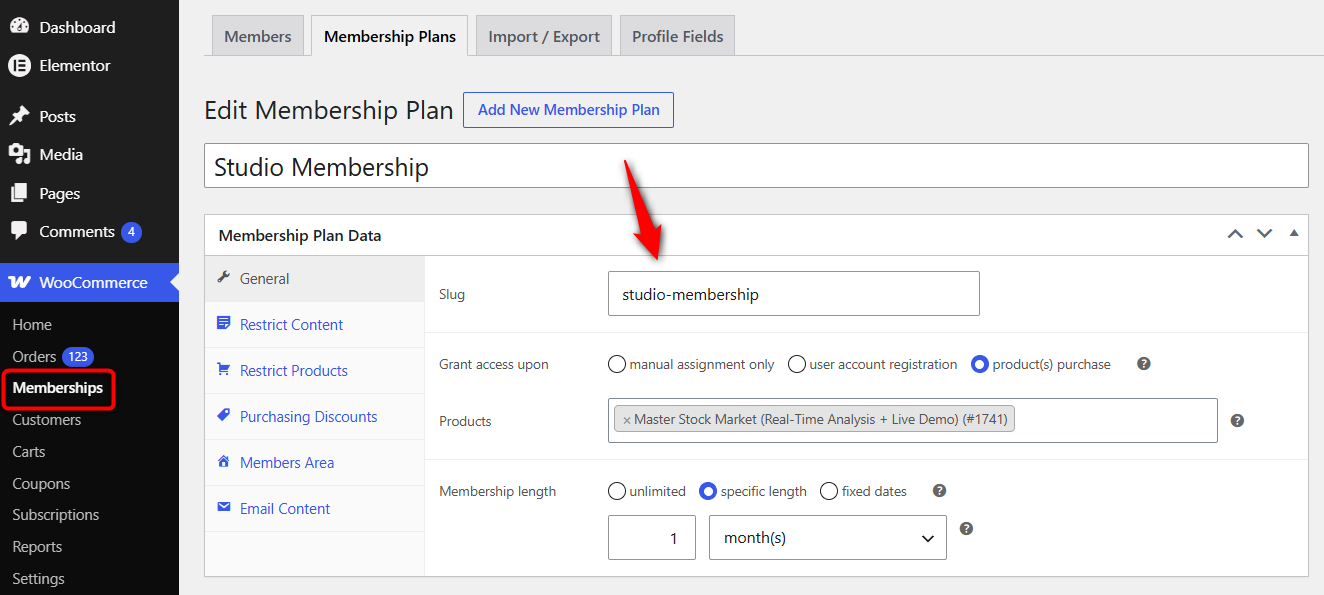
Assign a product created that grants access upon.
You can restrict individual posts, pages, full categories, courses, products, or your entire site.
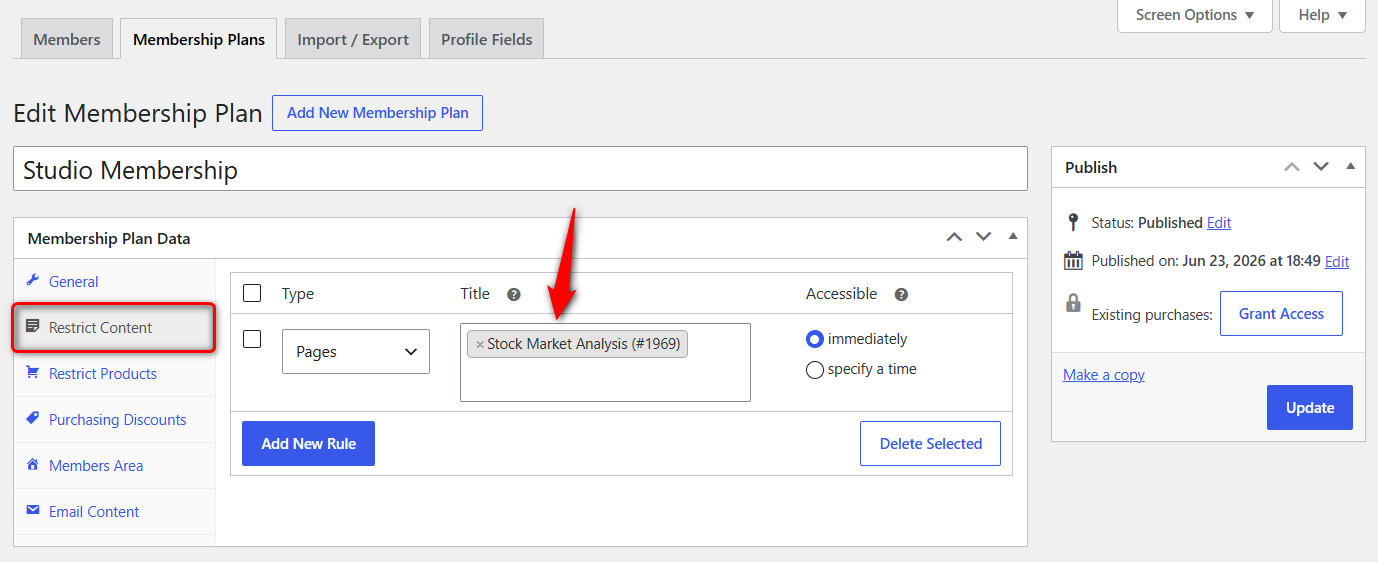
Set a landing page that non-members see when they hit gated content, such as a sign-up or login page.
If you plan to offer tiers, create one plan per level so each tier unlocks its own content.
Step 2: Create the subscription plan
Turn the product that grants membership into a subscription. You get three plans to choose from based on your requirements:
- Recurring subscriptions for digital products
- Subscribe & Save for physical products
- Installment plans for high-ticket items
Set the billing frequency (example, monthly or yearly) and the price per cycle.
Add a free trial if you want members to start before billing begins, and add a sign-up fee if you charge a joining cost.
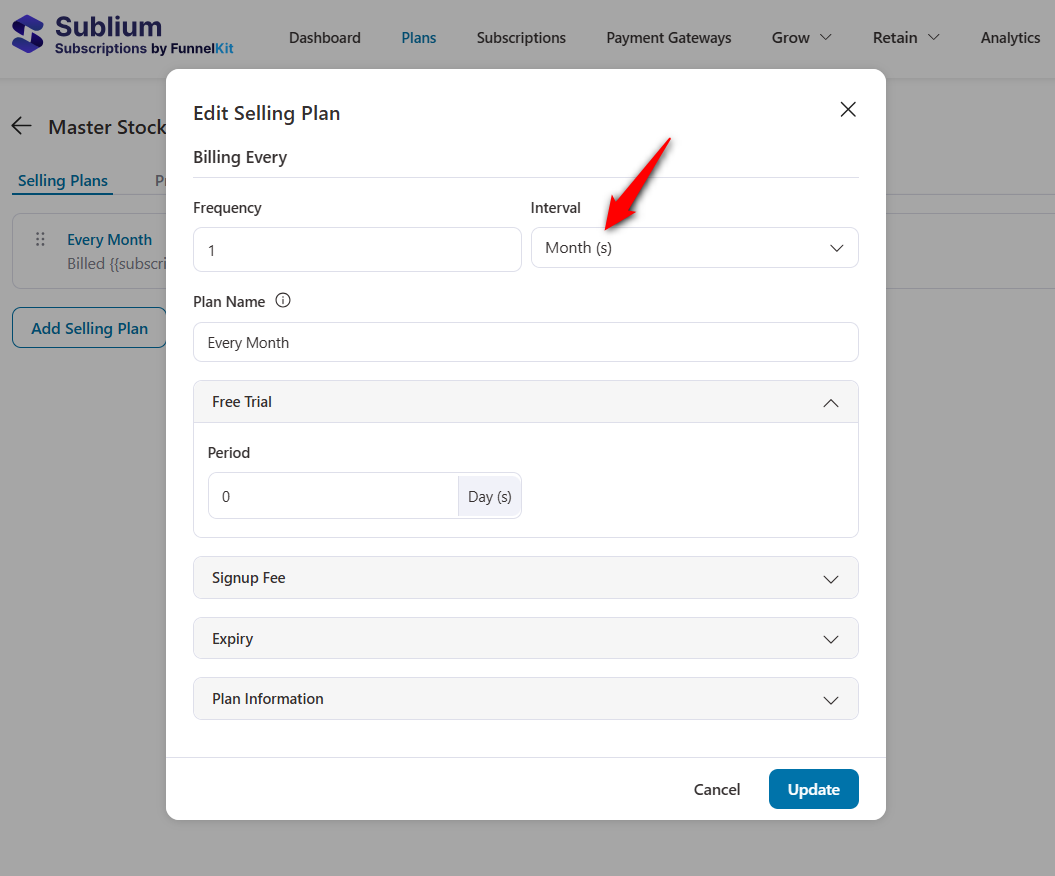
Assign the product to this subscription plan.
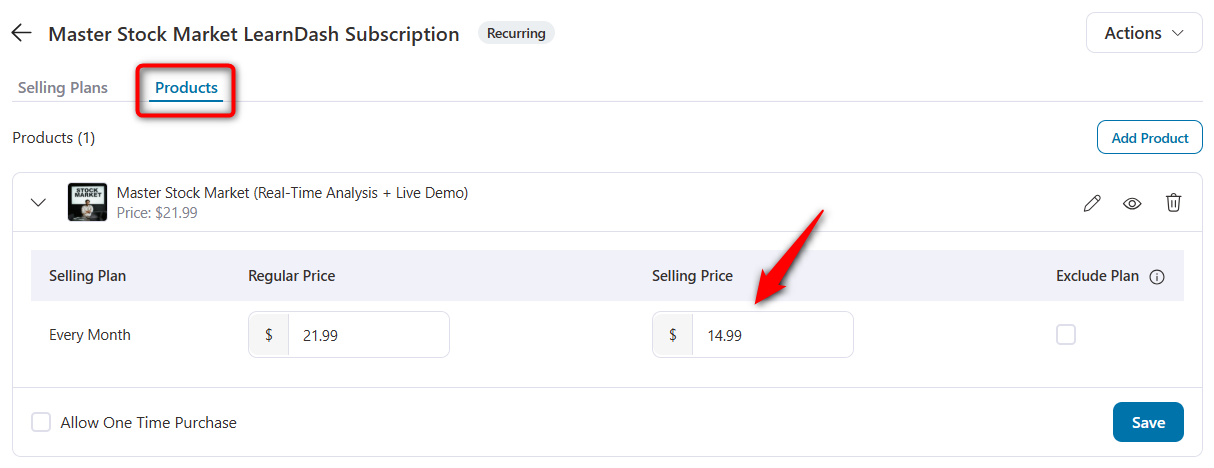
For tiered memberships, create a separate subscription product for each level so customers can choose the plan that fits them.
Learn how to create a subscription that sells effectively in WooCommerce.
Step 3: Connect the subscription to the membership
Inside the Sublium Subscriptions, go to Settings ⇨ Integrations and enable the WooCommerce Memberships option.
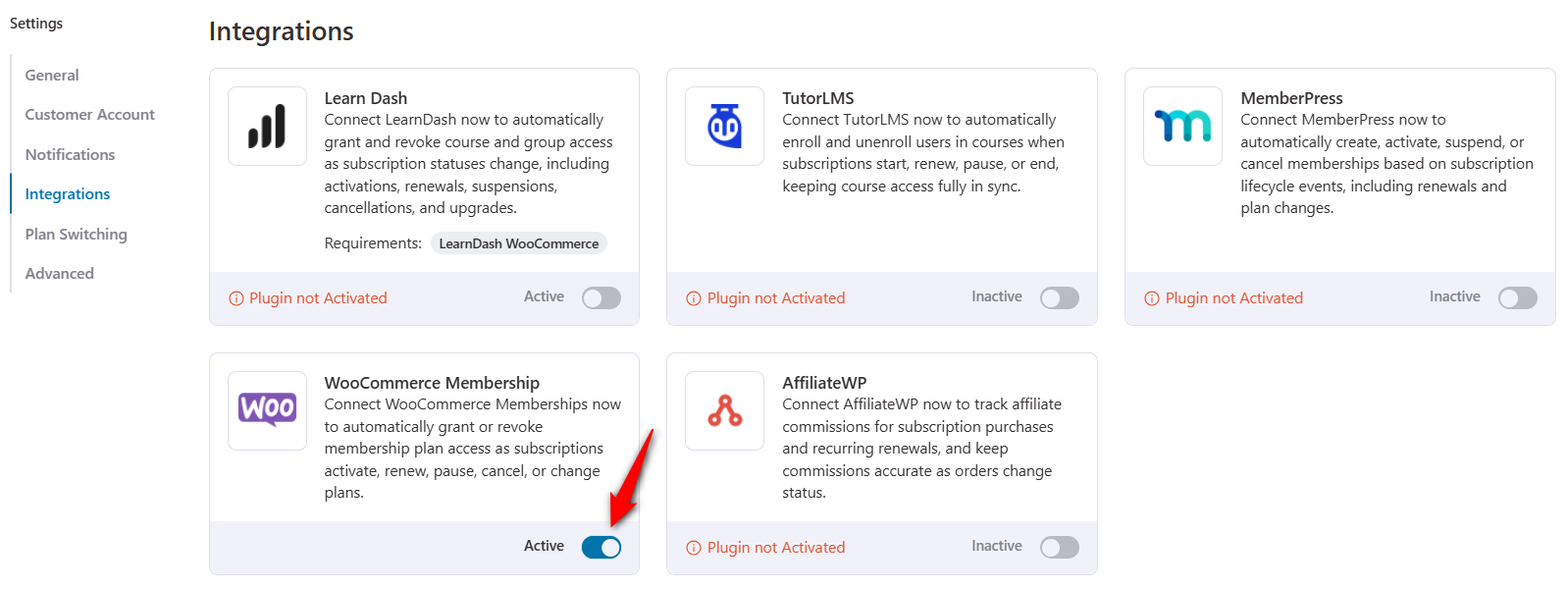
That’s it! You’ve successfully set up the WooCommerce membership subscription plan in your store.
Step 4: Test the full member journey
Place a test order for your subscription product to confirm the end-to-end flow. Make sure to go to the product page, add it to your cart, and head to the checkout page.
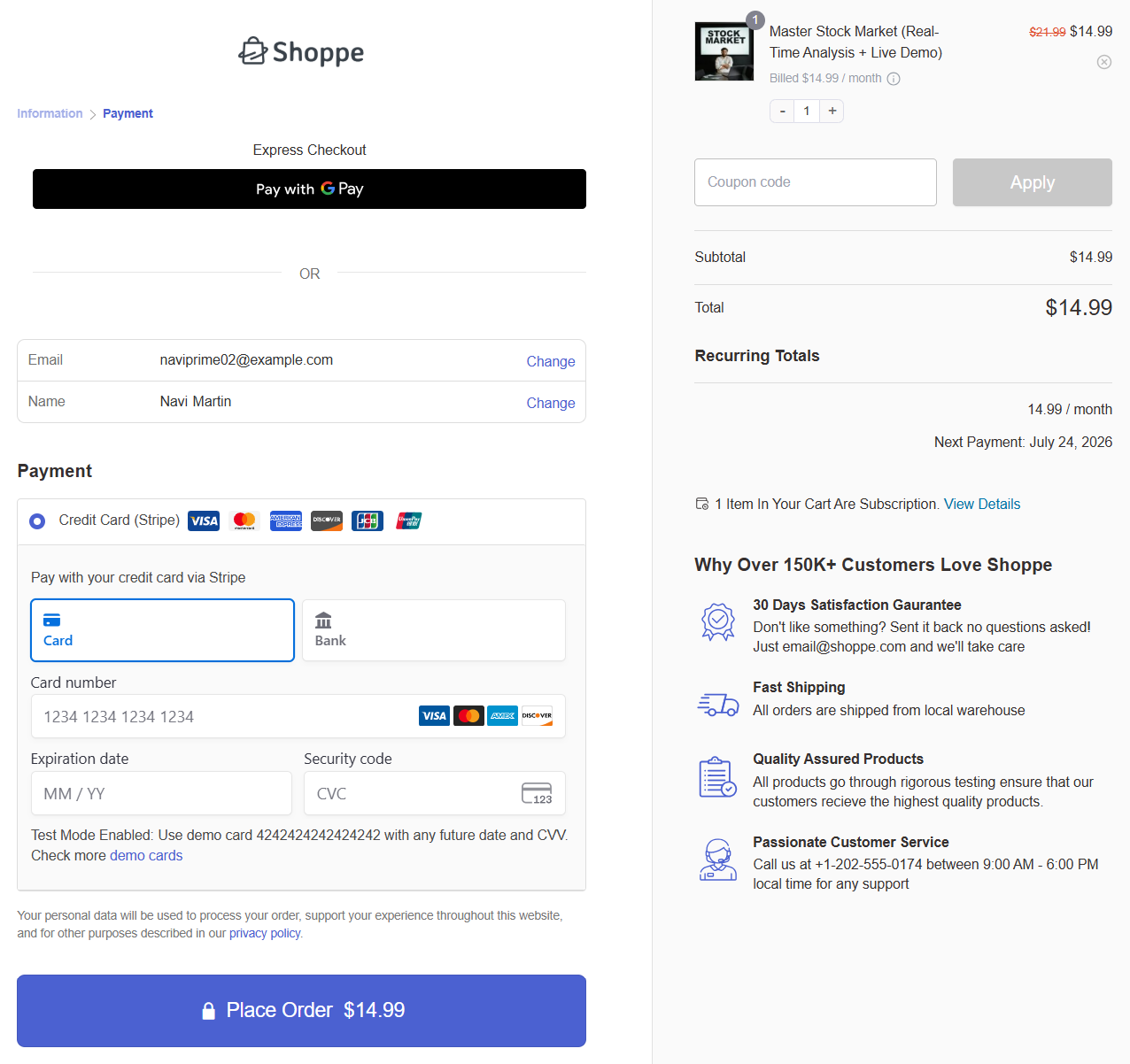
Check that membership access is granted right after checkout, that gated content unlocks, and that the subscriber portal shows the active plan.
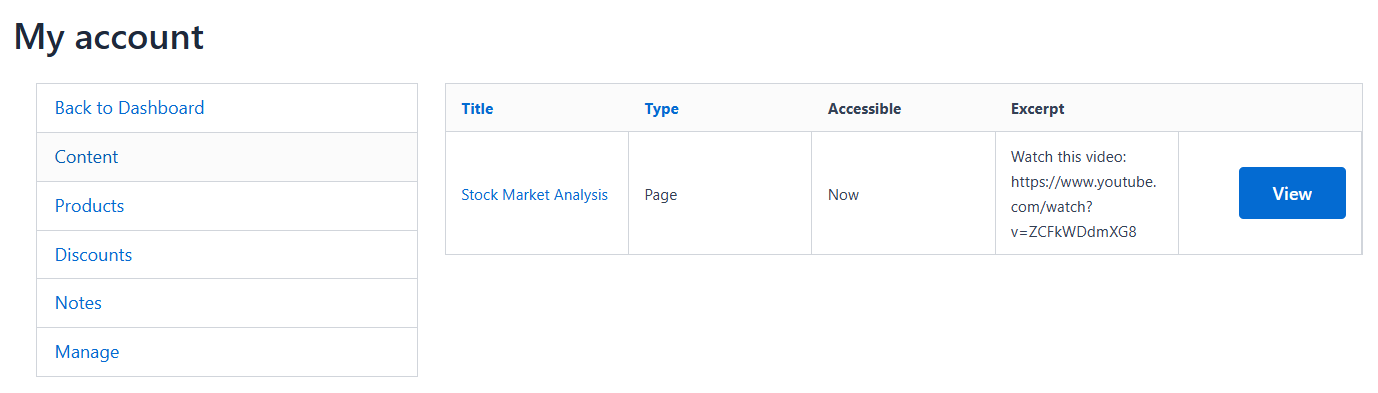
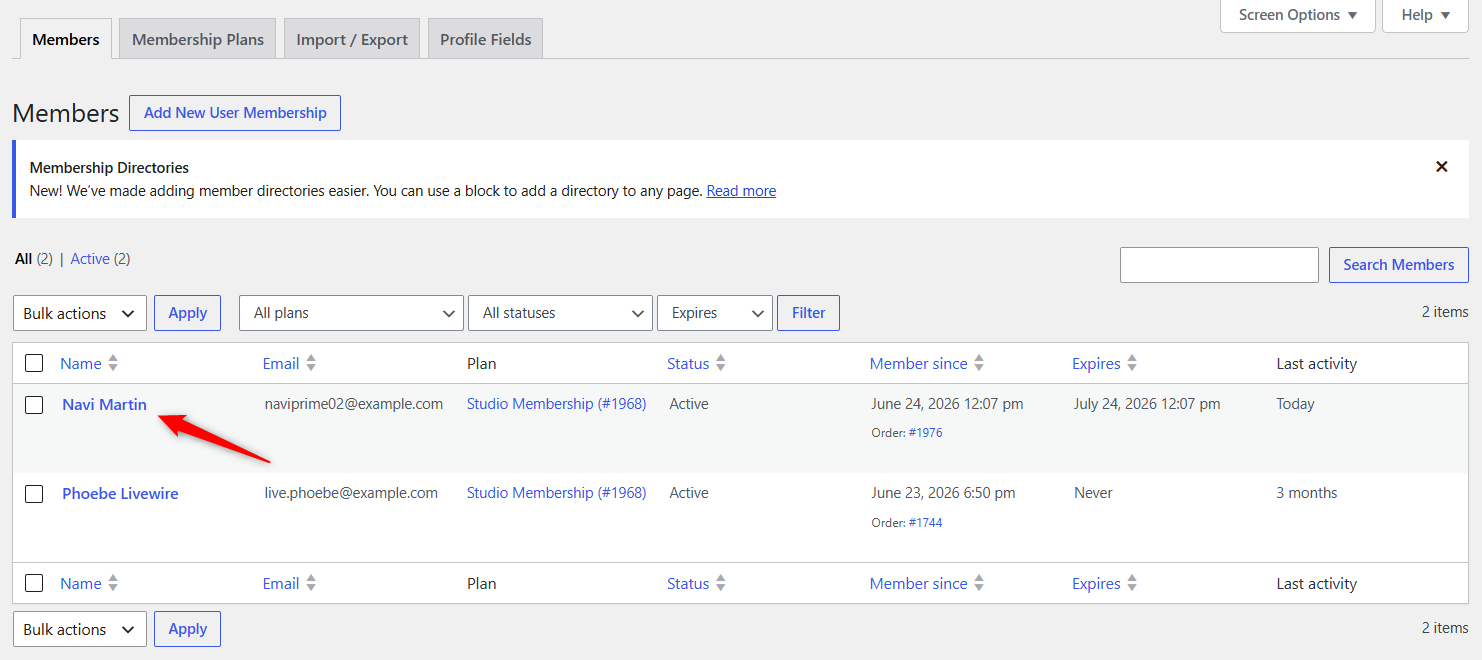
For the admin side, you can view all your members inside WooCommerce Memberships:
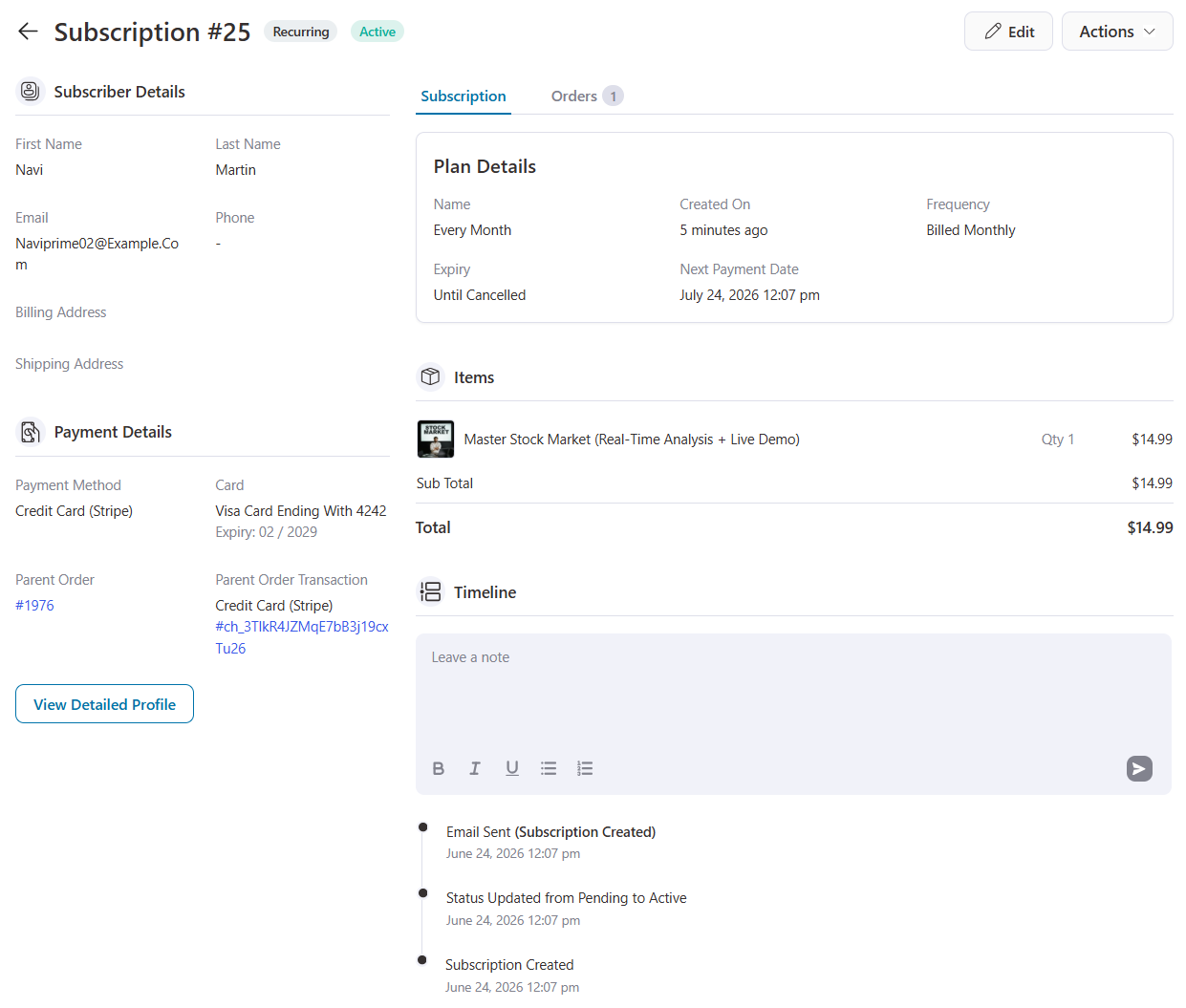
In Sublium, you can see everything about the subscription plan, including the amount, items, expiry date, and more.
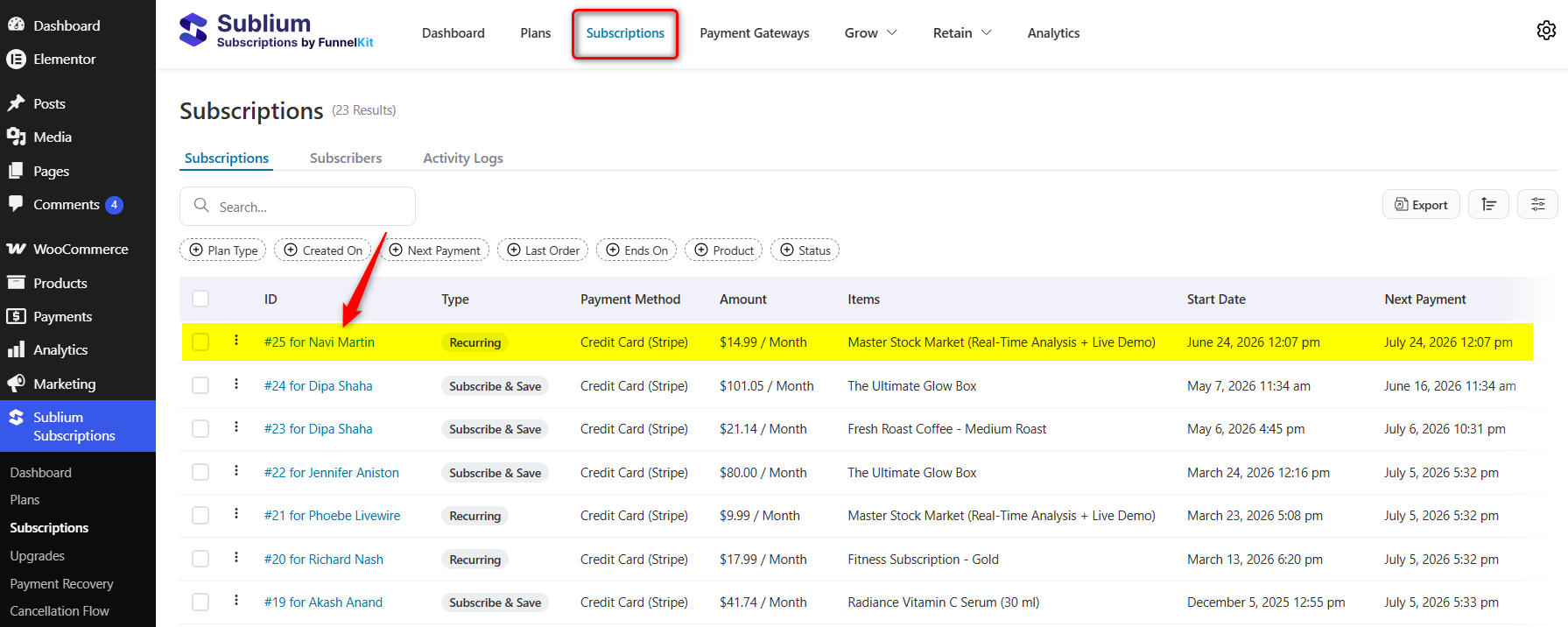
Click on the name to see their complete subscription profile.
Then test a cancellation in a staging environment to confirm access is removed when the subscription ends. Run the same test on mobile, since most members will sign up and manage their accounts on a phone.
The Subscription Lifecycle: Keeping Membership Access in Sync
A membership is only as reliable as the subscription behind it. If billing fails silently or a cancellation does not revoke access, you either lose revenue or give away your content for free.
Here is what happens at each stage of the subscription lifecycle and how to handle it.
- On renewal
When the subscription renews successfully, membership access simply continues. No action is needed.
The value of automation is that renewals occur on schedule without you having to send invoices or manually extend access.
- On failed payment
A failed renewal does not mean the customer wanted to leave. It usually means an expired card.
Sublium handles this with automatic payment retries, dunning emails that prompt customers to update their details, and a card updater that flags expiring cards before they fail.
Automated dunning and grace periods can reduce involuntary churn by around 20%.
- On cancellation
When a member cancels, access should end cleanly at the close of the paid period.
Sublium deactivates membership access when the subscription is cancelled, so you are not giving away gated content to former members.
A cancellation flow with an exit survey and a pause option can save many of these customers, since pause usage across the subscription industry has risen sharply as a churn-reduction tool.
- On pause
Pausing lets a member keep their account without being charged for a set period. Access is suspended during the pause and restored when billing resumes.
Offering a pause instead of canceling is one of the most effective ways to keep members.
- On expiry
Fixed-length plans end automatically on their expiry date, and access is removed. For ongoing plans, there is no expiry as long as renewals keep succeeding.
The takeaway is that the subscription engine controls revenue health. Top subscription businesses aim to keep monthly churn below 5%, and most of that work happens in how failed payments, cancellations, and pauses are handled.
A subscription tool with robust recovery features keeps your membership site profitable rather than leaky.
WooCommerce Memberships and Subscriptions Plugins Compared
You have several options for each layer of the stack. Below is a comparison of the most common membership and subscription plugins so you can choose the one that fits best.
| Plugin | Layer | What it does | Recurring billing |
|---|---|---|---|
| WooCommerce Memberships | Membership | Official access-control extension for gating content and products | No (needs a subscription plugin) |
| Members Only for WooCommerce | Membership | Restricts products, posts, pages, and categories with multiple plans | No (pairs with a subscription plugin) |
| MemberPress | All-in-one | Standalone membership platform with its own checkout and billing | Yes (built in) |
| Paid Memberships Pro | All-in-one | Membership levels with content restriction and recurring billing | Yes (built in) |
| WooCommerce Subscriptions | Subscription | The original WooCommerce recurring-payments extension | Yes |
| Sublium Subscriptions | Subscription | Recurring billing with dunning, cancellation flows, card updater, portal, and access sync | Yes |
The official WooCommerce Memberships and MemberPress plugins are strong at access control but rely on a separate subscription plugin for recurring payments.
All-in-one tools like MemberPress and Paid Memberships Pro bundle billing and restriction together, which is simpler but keeps you inside their ecosystem rather than the full WooCommerce one.
On the subscription side, the choice comes down to billing reliability and retention features.
What makes Sublium worth considering for the subscription layer is its focus on the lifecycle problems above.
Beyond basic recurring billing, it includes payment recovery with smart retries, a proactive card updater, a cancellation flow that offers pause before cancel, a self-service subscriber portal, and built-in MRR and churn analytics.
Those features directly address where membership sites lose money: involuntary churn and unmanaged cancellations. It works alongside your content-restriction plugin rather than replacing it.
6 Best Practices to Build a Profitable Recurring Membership
These practices build on the setup above and add new value beyond it.
- Offer annual plans alongside monthly. Annual billing improves cash flow and cuts churn because members commit for longer. Price it as a clear saving over twelve monthly payments.
- Send renewal reminders before charging. A heads-up 3 to 5 days before billing reduces surprise chargebacks and refund requests. It also builds trust, which keeps members longer.
- Lead with pause, not cancel. When a member tries to leave, offer a pause or a downgrade first. Many would-be cancellations choose to pause instead, which protects your recurring revenue.
- Recover failed payments automatically. Set up retry logic and dunning emails so expired cards do not quietly end memberships. This is often the single highest-impact change for membership revenue.
- Gate the right content, not everything. Keep some free content to attract and convert new members. Lock the high-value material so the membership feels worth paying for.
- Give members a self-service portal. Let members update cards, swap tiers, and manage billing without emailing support. This cuts support load and reduces involuntary churn from failed renewals.
Frequently Asked Questions
The subscription goes on hold and membership access pauses until payment is recovered. Whether the member is saved depends on your tool’s dunning, automatic retries, and failed-payment emails. Weak recovery here causes avoidable churn.
Yes, members can upgrade and downgrade their plans via subscription switching. Customers move between tiers (e.g., Silver → Gold) from their account page, with proration handled automatically. Admin-initiated changes to the official stack require manually updating the membership plan.
Some plugins offer free or freemium versions with limited features, and there are free community membership setups. For recurring billing with payment recovery, trials, and a subscriber portal, a paid subscription plugin is usually the more reliable choice.
Start Selling Recurring WooCommerce Memberships and Subscriptions
Memberships and subscriptions are two halves of paid access that take care of themselves. The subscription bills; the membership unlocks; together they renew and revoke without you touching anything.
We covered how to set up recurring membership plans and keep member access in sync as payments renew, fail, or are canceled.
For the subscription side of that stack, we recommend Sublium, since its payment recovery, card updater, cancellation flow, and subscriber portal target exactly where membership sites lose revenue.
Pair it with your content-restriction plugin to run a reliable, profitable recurring membership.
Ready to add recurring billing to your membership site? Get started with Sublium!


